Forum Discussion

How do I remove "English (United Kingdom)"?
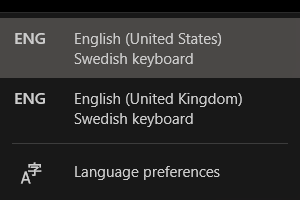
- Aug 02, 2021
I'm very sorry SamirGunic but I have no more ideas.
Such setting must be hidden somewhere but not in the usual places.
Clean install or live with this annoyance.


I had this same problem. I tried all the solutions in the reply section and none worked, but I managed to fix the issue by opening Settings -> Time & Language -> Language. Then, under "Preferred Languages", I clicked on "English (United States)", clicked on "Options", and then clicked on "Add a keyboard" to add "Swedish" and then remove "Swedish". That fixed my issue. Refer to the images below for a walkthrough.
Hopefully, this solves the issue for anyone who gets this problem again.
 FulleyJun 05, 2024Copper ContributorThank you!!!! works!
 BennyGalerJan 14, 2022Copper Contributor
I agree with you that this windows sh*t issue is very annoying but here is your solution I have found that solved the problem immediately for me and will probably help you too
https://youtu.be/y0NrdGBaCAE
Let us know if you have succedded, good luck!Note! if you have already deleted english united kingdom in regedit and it doesn't appear anymore under the path
Computer\HKEY_CURRENT_USER\Control Panel\International\User Profile\then you need to start by adding back english untied kingdom by typing 'add language' in settings. and then follow the video in the link.
 COMPO_ABJan 31, 2024Copper Contributor
Thank you! This method worked for me. Don't bother with the rest. BennyGaler
 christoseFeb 25, 2022Copper Contributor
The way that I did it was to reinstall the ENG (UK) language package and to remove it afterwards. BennyGaler Go to:
Add the ENG UK Language
Let is INSTALL and then REMOVE IT
I hope that works for you
- YordanPetkovNov 26, 2022Copper Contributor
Brother, thank you very much for your answer, I've been trying to fix this problem for half a day now and your solution helped me out!
Best regards,
Y. P.

