Forum Discussion

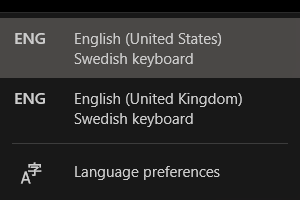
How do I remove "English (United Kingdom)"?
- Aug 02, 2021
I'm very sorry SamirGunic but I have no more ideas.
Such setting must be hidden somewhere but not in the usual places.
Clean install or live with this annoyance.

If you prefer good ole command prompt, I have you covered 🙂
From an elevated Prompt type these two commands:
reg export HKEY_LOCAL_MACHINE\SYSTEM\CurrentControlSet\Control\ContentIndex\Language %userprofile%\desktop\language.reg
reg delete HKEY_LOCAL_MACHINE\SYSTEM\CurrentControlSet\Control\ContentIndex\Language\English_UK
To restore:
reg import %userprofile%\desktop\language.reg

Unfortunately this was not good enough for Windows. I have removed "English_UK" and rebooted.
I also checked the first (001) control set hive where control parameters are stored.
HKEY_LOCAL_MACHINE\SYSTEM\ControlSet001\Control\ContentIndex\Language
HKEY_LOCAL_MACHINE\SYSTEM\CurrentControlSet\Control\ContentIndex\Language
In both of these locations, I only have "English_US" and "Neutral". The "English_UK" key has been removed with success. But I still have "English (United Kingdom)" in system tray as a language option.
I have restored (imported) the Reg file I exported previously (all of ContentIndex). I then tried to do a German switcheroo by adding German language to the mix so I can kick out "English (United Kingdom)". That didn't work, as you can see by the screenshots below.
This is hopeless... I'm not reinstalling Windows again.
- SamirGunicAug 02, 2021Brass Contributor
As a last test, I created a new local user account. By default, Windows adds following "preferred languages":
- English (Sweden)
- English (United States)
- English (United Kingdom)
I guess it inherits the "English (United Kingdom)" by some magical glue. But at least it's shown in the Settings app for this new account.
The display language was set to "English (United States)", as expected.
The "Swedish keyboard" was applied to "English (United States)" and to "English (United Kingdom)". The "English (Sweden)" had no keyboard applied to it. I think it only adds Swedish spell checking support, inking support and Swedish dictionary (if I'm reading the symbols/icons above correctly).
After removing "English (United Kingdom)" I am left with "English (United States)" with Swedish keyboard (what I wanted all along), and "English (Sweden)" with Swedish keyboard (this seems as if Swedish keyboard has been moved from the removed English (United Kingdom) to this English (Sweden) where there was no keyboard previously).
At this point I could just remove "English (Sweden)" and keep only "English (United States)" with Swedish keyboard. This would remove the language selection icon from system tray. Except Swedish spell checking would not work in Windows and across all apps, and I do want to intend support for more languages (UK English is just not one of them, and the reason I wanted to remove it).
The main problem with this "solution" is that this is not my user account. I would like to be able to remove "English (United Kingdom)" equally as easy on my main account as I just did on this test account.
Windows and its languages and locale settings... absolutely horrible!
- SpigoloAug 02, 2021Iron Contributor
Try this procedure.
Open Control Panel
Region
tab Administrative
Copy settings
Check both flags under Copy your current settings to and confirm:
Now restart and create a new local administrator user and login with it.
Check if English UK is still present in language settings.
 ali32768Jan 10, 2023Copper ContributorIt worked for me, Thank you very much.