Forum Discussion

zenstrata
Mar 10, 2022Copper Contributor
Help Needed! GPU Specification not working properly
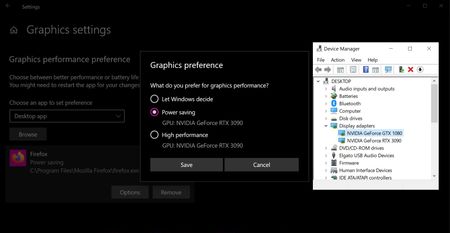
I often run multiple tasks on my machine, I have two video cards installed, a GTX1080 and an RTX3090. Commonly I will have a game running on the primary monitor, and have web browsers or videos play...

zenstrata
Mar 10, 2022Copper Contributor
dxnnieYes, the option in the Nvidia control panel only applies to applications which use CUDA or are using OpenGL rendering. Sadly windows will still try to load up applications on the 3090 instead. currently all the applications which are seen as running on the 3090 in that status monitor, have been told to run on the 1080. But because windows defaults to the 3090 for everything, it loads the programs to the 3090 instead of allowing me to shunt weaker tasks to the 1080 and save the 3090 for the programs that need the power of the newer card.
Windows should simply allow users to specify which GPU is used for power saving, and which GPU is used for high performance. That would solve the entire problem.
zenstrata
Mar 11, 2022Copper Contributor
It appears that windows is using the card placed into the first slot as the card for both the 'power saving' and 'high performance' options by default. So there is no intelligent picking even going on. Windows is just picking whatever is in the first slot, and not even allowing proper access to any GPU that is in secondary slots.
[This info came from a user on another forum named kram36 who posted -- "I just fired up my AMD system with 2 cards in it. A RTX 3050 and a GTX 1050 Ti. What I found out is Windows is going to select the GPU in the first PCIe slot, not matter what. When I had the 3050 in the top slot, Windows only gave me that card for both options. When I had the 1050 Ti in the top slot, Windows only gave me that card for both options.
It looks like you're stuck with the 3090 only option."]
[This info came from a user on another forum named kram36 who posted -- "I just fired up my AMD system with 2 cards in it. A RTX 3050 and a GTX 1050 Ti. What I found out is Windows is going to select the GPU in the first PCIe slot, not matter what. When I had the 3050 in the top slot, Windows only gave me that card for both options. When I had the 1050 Ti in the top slot, Windows only gave me that card for both options.
It looks like you're stuck with the 3090 only option."]