Forum Discussion

How can I tell if I'm enrolled in ESU with my Windows 10? I want to extend my enrollment period.
- Aug 13, 2026
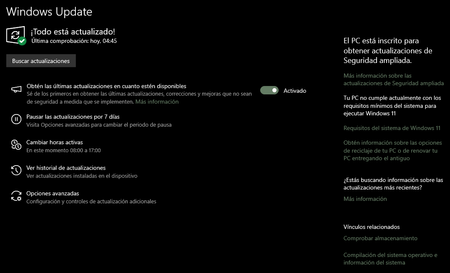
Your screenshot already confirms enrollment: Windows Update says, in Spanish, that the PC is enrolled to receive Extended Security Updates. For the consumer program, this is the status Microsoft tells you to check under Settings > Update & Security > Windows Update. You do not need to buy or re-enroll to extend the date. Microsoft’s current guidance says an existing consumer ESU enrollment continues automatically through October 12, 2027. Keep Windows 10 22H2 updated and continue using the Microsoft account associated with enrollment. If you purchased ESU, you can check that account’s order history, but Windows Update is the direct device check. ESU covers critical and important security updates; it does not add feature improvements or general technical support. If the enrollment message disappears, install pending updates, restart, and check Windows Update again. For a domain-joined, Entra-joined, or MDM-managed PC, contact IT because commercial ESU uses a different activation process.

Your screenshot already confirms enrollment: Windows Update says, in Spanish, that the PC is enrolled to receive Extended Security Updates. For the consumer program, this is the status Microsoft tells you to check under Settings > Update & Security > Windows Update. You do not need to buy or re-enroll to extend the date. Microsoft’s current guidance says an existing consumer ESU enrollment continues automatically through October 12, 2027. Keep Windows 10 22H2 updated and continue using the Microsoft account associated with enrollment. If you purchased ESU, you can check that account’s order history, but Windows Update is the direct device check. ESU covers critical and important security updates; it does not add feature improvements or general technical support. If the enrollment message disappears, install pending updates, restart, and check Windows Update again. For a domain-joined, Entra-joined, or MDM-managed PC, contact IT because commercial ESU uses a different activation process.
 edcarballoAug 17, 2026Copper Contributor
Are you saying that my computer with Windows 10, which was already enrolled last year, will remain enrolled for another year?
I thought I should extend it because my problem is that I work with Adobe and my computer doesn't meet the specifications Windows needs to install Windows 11.
Thanks for your help.