Forum Discussion

Contacts in Teams not showing work phone number


Hi,
In the contact card you will see numbers from Active Directory. So If you check in Azure Active Directory or Windows Active Directory you can see the number that Teams will show in the contact card. Teams will show Office Phone if that exists, if it is empty like in the example below Mobile phone will be shown instead. If both of them are empty no number will be shown.
The Work number is that the number you assigned to the user in Teams (LineURI)? That is not shown if you don't enter it in Office phone field in AD. So If you want to show the work number in the contact card enter it in the Office phone field, you could create a Powershell script that do that for you.

LinusCansbyAzure Active Directory is correct maintained with office & mobile number. See the attached screenshot. In Teams at the call button I don`t see any work number only mobile number doesn`t matter if the person has LineURI added or not. This behavior is by all our users.
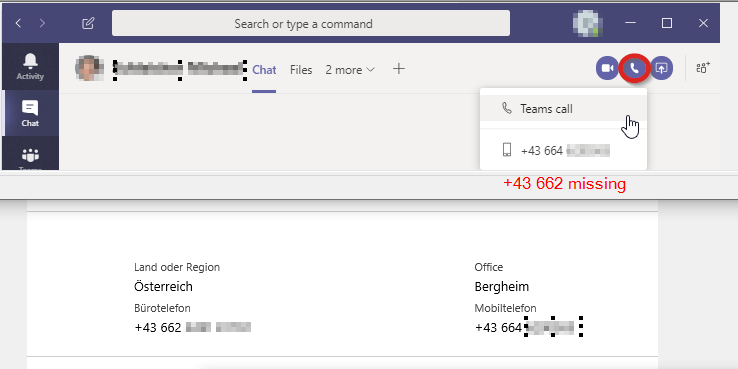
- LinusCansbyFeb 11, 2020MVPYes, you will only see one number there. So if the contact have a mobile phone number in Active Directory you will see that (as you do), if you only have a Office phone number you will see that. Teams will only show one number.
You can vote for this uservoice requesting to show more phone numbers.
https://microsoftteams.uservoice.com/forums/555103-public/suggestions/38953924-have-more-than-one-phone-number-per-contact
Also for the contacts you add to Outlook you can have more than one phone number listed in Teams. You will see these contacts in Teams Calls app under contacts.- Michael SchleicherFeb 11, 2020Copper Contributor
Hi Linus thanks for your information. Is there a possibility to show in Teams the work phone number instead of the mobile number? As you know both numbers (mobile & work) are in AAD available in my company.
- LinusCansbyFeb 12, 2020MVP
No, that is not possible. But it would be good if more numbers (all) were shown in the contact card. Vote for the uservoice and we might get it.