Forum Discussion

Universal Print Cannot Find UP Printers When Printing From Microsoft 365 --- Sort of
 Oct 31, 2023
jbush1120 here with an update.
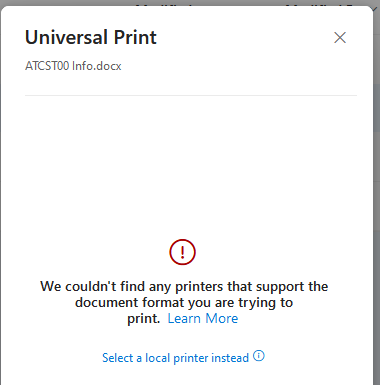
First: I didn't explain when that error screen was displayed. After logging into office.com and navigating to OneDrive, I would select my file (under the 'My Files' icon) and select 'Print' from the files context menu. That's when Office.com displayed the error message.
I got it to work as expected. Here are the steps I stumbled up:
I obtained a Windows 11 PC and joined it to my test Azure AD.Next, I logged into that PC with my non-Global Admin test account
To my surprise, I was able to install the UP printer on that system
After logging out of that PC, I returned to my 'regular' work laptop, opened a browser, and logged into Office.com with the same non-Global Admin account. And now, the UP printer is displayed as an option to print (as expected). I successfully printed to the UP printer.
jbush1120 here with an update.
First: I didn't explain when that error screen was displayed. After logging into office.com and navigating to OneDrive, I would select my file (under the 'My Files' icon) and select 'Print' from the files context menu. That's when Office.com displayed the error message.
I got it to work as expected. Here are the steps I stumbled up:
I obtained a Windows 11 PC and joined it to my test Azure AD.
Next, I logged into that PC with my non-Global Admin test account
To my surprise, I was able to install the UP printer on that system
After logging out of that PC, I returned to my 'regular' work laptop, opened a browser, and logged into Office.com with the same non-Global Admin account. And now, the UP printer is displayed as an option to print (as expected). I successfully printed to the UP printer.