Forum Discussion

Universal Print Cannot Find UP Printers When Printing From Microsoft 365 --- Sort of
 Oct 31, 2023
jbush1120 here with an update.
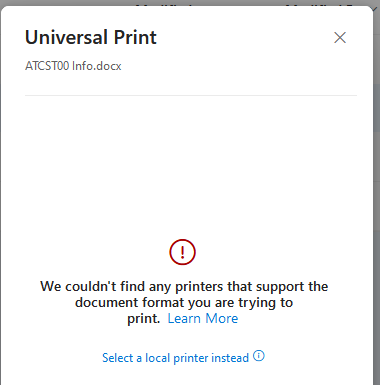
First: I didn't explain when that error screen was displayed. After logging into office.com and navigating to OneDrive, I would select my file (under the 'My Files' icon) and select 'Print' from the files context menu. That's when Office.com displayed the error message.
I got it to work as expected. Here are the steps I stumbled up:
I obtained a Windows 11 PC and joined it to my test Azure AD.Next, I logged into that PC with my non-Global Admin test account
To my surprise, I was able to install the UP printer on that system
After logging out of that PC, I returned to my 'regular' work laptop, opened a browser, and logged into Office.com with the same non-Global Admin account. And now, the UP printer is displayed as an option to print (as expected). I successfully printed to the UP printer.

- CimedacaOct 30, 2023Brass ContributorNote that as of some number of weeks ago, "seeing" the printers in OneDrive is no longer the default. The printer selection box is now also a search box. This is especially not obvious if you had printed from OneDrive before the change. You must know part of the name of a printer and search for it to select it. Since we don't have all that many printers, I actually renamed all of our queues and appended " Printer" to the end so printers can be found by just typing "Pri" in the new dropdown/printer search field.
- OscarGagnonOct 30, 2023Copper ContributorLast week I couldn't see printers from Excel Online but today I can. However from OneDrive, I still don't have the search box, it gives me the error like in the screenshot. Also I find it strange that it's possible to print to Universal Print from Excel Online but not from Word Online.
- CimedacaNov 03, 2023Brass ContributorYes.. printing from Excel online first is very strange to me. I mean--seriously why? Did some huge accounting firm make that part of their Google apps switch requirement or something? I also don't like that couldn't find printing from Word Online on any Universal Print feature roadmap.
- CimedacaOct 30, 2023Brass Contributor
Open Excel online and print to one of the UP printers that show up there. This was a recommendation from Microsoft support, and it did work to make the error above go away. The printers now are searchable in OneDrive for the user account where I printed from Excel online first. I was also told this bug should be fixed in approximately 30 days. So... yea... for now... users just have to jiggle it a little to make it work. 😐