Forum Discussion

Universal Print - Konica Minolta Limited Printing Preferences
 Mar 02, 2022It actually works fine now, Konica just released some new drivers last week.

- Saurabh_BansalOct 29, 2021
Microsoft
AdamK_DC / JoshEberly - For best experience, printers need to work directly with Universal Print using the IPP standard protocol. Konica Minolta has announces firmware updates and printers that do so - https://docs.microsoft.com/en-us/universal-print/fundamentals/universal-print-partner-integrations#konica-minolta-bizhub-i-series.
If you use a Konica Minolta Universal Print ready printer, then you DO NOT need a connector.
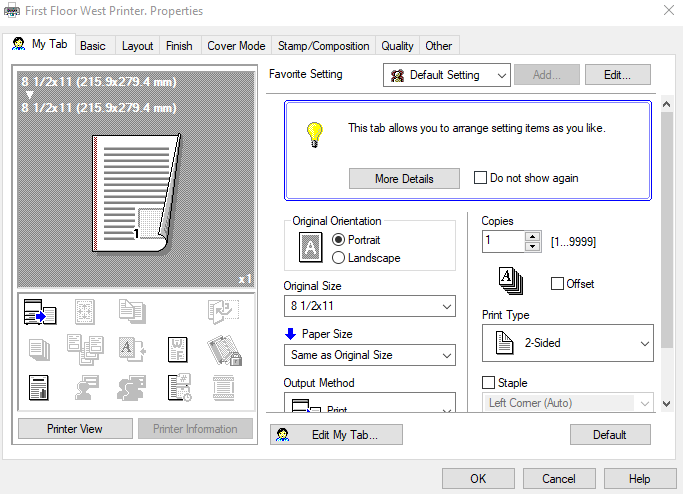
If you are using a connector, then what options show-up really depends on the quality of print driver being used on connector. Universal Print uses the Windows Print schema to identify attributes - however, some drivers use their own schema which can be very hard to interpret. For more details on how this is done, refer to the documentation. You may want to your printer OEM on whether they recommend a particular driver to be used on connector.
There might be some customizations possible - however, you will have to work with Microsoft Support.
Regarding Secure printing - are you using PIN? For printers that work on protocols (instead of drivers), Windows added support for PIN printing in Windows 11. Universal Print printers work on protocols as well and PIN printing is supported provided the printer OEM has enabled the PIN option for their Universal Print ready printers.
- AdamK_DCOct 31, 2021Brass ContributorThanks for your reply. In my case, the printer is many years old - and thus is not Universal Print Ready and must be accessed via a connector. The Konica print drivers on our print server has bidirectional communications with the printer - and is automatically configured. The Microsoft UPD doesn't pick up any of the features of the printer - and thus is not a practical solution at this time.
It would appear that this is a rather young solution that hasn't matured yet. Old printers continue to work for years and years. Companies aren't likely to replace them just to get models that speak with Azure. IMHO.- bouyakaMar 02, 2022Tin Contributor
Hi
I have the exactly same issue with Konica Printers (759e), the stappling feature is missing and this is really annoying. Did you find a solution ? I installed latest konica drivers but no changes.