Forum Discussion

Slow Printing HP Futuresmart 5.9.0.2

 Microsoft
Where are you printing from? Are you printing from Microsoft Edge or Chrome browser? Have you tried printing the same PDF document from another app like Acrobat?

Hello,
We are MS Addicted ! Printing from EDGE for sure 😁
(and same thing from Adobe, Chrome and with differents documents)
Regards,
A.
- Saurabh_BansalDec 23, 2025
When printing from Edge and Chrome, they rasterize into PDF before sending the print payload to Windows and then Windows sends the same PDF to Universal Print (if the target printer is Universal Print ready and has document format as PDF). Rasterization leads to loss of fonts and everything converted to small bitmaps - this results in more memory requirements on printer and lower print speeds.
You should be able to download the printed payload from Universal Print using PoweShell or Graph API and then open in any PDF reader. Check the font information there if it shows anything. If not, it has been rasterized!I would be surprised if Adobe too rasterizes the PDF sent to Windows Print 🙂.
- Antoine26Dec 24, 2025Copper Contributor
Hello Saurabh
Adobe can rasterizes too if you check "print like an image".
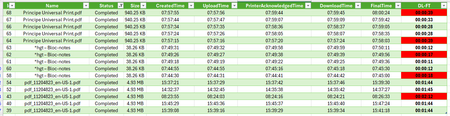
Main question is why for the same document printing in the same environement, few times HP MFP doesn't delivered the same internal printing time...
Regards,
A