Forum Discussion

Slow Printing HP Futuresmart 5.9.0.2
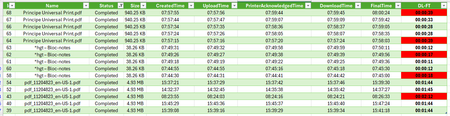

Hi Antonie26,
Hopefully I can assist. My name is Pedro and I’m part of the HP Authentication Suite team. We enable card, Biometrics or phone release with MFA and native integration with Microsoft productivity services (Email, OneDrive, SharePoint, Teams and Universal Print (MUP)) directly on HP print devices, without the need for any third-party integrations.
Some of the delays we typically observe relate to network latency, but in your case the results you shared indicate that the slowdown is occurring after the files have been downloaded. To help us better understand your environment, could you provide a bit more detail about your testing?
- Which HP devices are you using for these tests?
- Are you seeing this behavior across all devices, or only specific models?
- What event are you using as the starting point for the “Download Time”?
- What event marks the end of the “Final Time”?
- How is the device configured to connect to MUP?
- Are you using any third-party solutions or connectors?
- If so, which ones?
- Which local print drivers are you using?
- Are you using any third-party solutions or connectors?
If a connector is involved, it can introduce additional variables, such as:
- the stability and performance of the network path between the connector and the print device
- the available resources on the connector PC, which may affect how quickly jobs are processed and forwarded to the printer
A native MUP connection on the device generally provides the best performance, as the file flows directly from the MUP service into the printer for processing.
Feel free to reach out (mup [at] hp [dot] com) and we can try assist you.
Regards,
Pedro
 Antoine26Dec 09, 2025Copper Contributor
Hello Pedro,
I'm happy to read you :)
To answer to your questions :
- E47528 & E87740dn
- All devices
- DOWNLOAD TIME : as describe by MS : time at which the printer finished downloading the print job
- FINAL TIME : as describe by MS : time at which the printer finished printing
- It's configure according to the : HP Technical white paper Microsoft Universal Print Support in HP FutureSmart 5.8.1.1
- We don't use third connector or third software
- In MUP case we use MS MUP Driver otherwise for local printing 9100 we use HP Color LaserJet MFP E47528 series PCL 6 V3/V4 Printer Driver (no installer)
Regards,
A
- P3dr0HPDec 23, 2025Copper Contributor
Hi Antoine,
Apologies for the delay in response.
You seem to be a few versions of firmware behind which would make it difficult to try replicate your issue, please could you upgrade your devices and retest?
E47528: https://ftp.hp.com/pub/softlib/software13/printers/E47528/E47528_fs5.9.0.2_fw_2509087_000116.zip
E877dn: https://ftp.hp.com/pub/softlib/software13/printers/E87740_50_60_70/E87740_50_60_70_fs5.9.0.2_fw_2509087_000114.zip
If possible, could you try using a non-confidential document to see if you get the same results? If so, would you mind sharing it with me (mup at hp dot com) so I can run some tests?
Regards
Pedro
- Antoine26Dec 29, 2025Copper Contributor
Hello Pedro,
Hope you're well ;)
I confirmed i'm allready up to date :
- FutureSmart Bundle Version 5.9.0.2 - HP Color LaserJet Enterprise E47528 Printer FIRMWARE
- 2509087_000116
- 380.0 MB
- 27 août 2025
I've mentionned 5.8.1.1, because it was the HP Technical white paper Microsoft Universal Print Support in HP FutureSmart 5.8.1.1 that i use to configure printer, but printer is allready 5.9.0.2 firmware. All my tests are done with 5.9.0.2 firmware.
Please look private msg to find three file example :)
best regards,
A