Forum Discussion

Schroedi
May 19, 2026Copper Contributor
Color mode Greyscale doesn't reflect on client
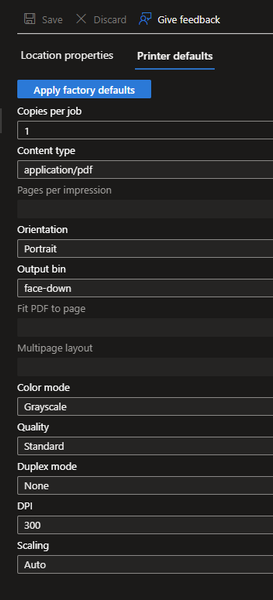
I've set the color mode from our printer from 'Auto' to 'Greyscale': It seems this change doesn't reach the Universal Print Class Driver on the client. The color mode remains 'Color': I...

Charlie34000
Jun 09, 2026MCT
The Universal Print Class Driver doesn’t fully inherit the backend defaults.
Even if the printer is configured as “Greyscale” in Universal Print (as shown in your backend settings), the Class Driver on Windows often keeps “Color” as the default.
This is a known limitation of the Class Driver. If you need Black/White as the enforced default, the reliable options are:
- setting Print Defaults locally via Print Management
- enforcing the setting through Intune / Windows policy
- or using a vendor‑specific Universal Print driver when available (they usually honor backend defaults)
So your configuration is correct — the limitation comes from the Class Driver, not from your setup.