Forum Discussion

OAuthPrompt not shown up
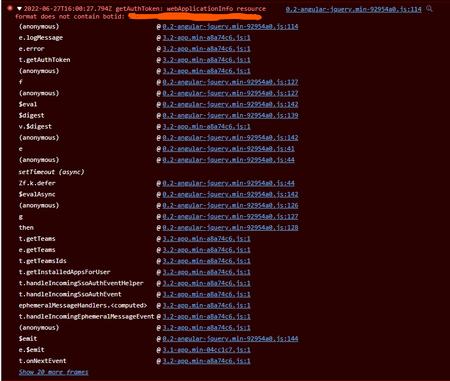


 Microsoft
Andrew Grebennikov -We are not able to repro the scenario,we are check this in teams it will show OAuth card in teams.
We are referring the below code-BotBuilder-Samples/Cards.cs at main · microsoft/BotBuilder-Samples (github.com)
Could you please share the repro steps/manifest, so that we can try it from our end?
- Andrew GrebennikovJun 29, 2022Copper Contributor
Sayali-MSFT I attached manifest I'm using for testing. Before bot was using regular http responses so it was easy to find out possible reason of the issue. Where can I check what response was sent by the bot now? How can I debug that?
- Sayali-MSFTJul 03, 2022
Andrew Grebennikov -If you are building a standalone bot, enter the Application ID URI as
api://botid-{YourBotId}. Here YourBotId is your Azure AD application ID.
Please check Azure Portal ->App Registration->Expose an API section bot id is same or not.
Please have look into this doc-Single sign-on support for bots - Teams | Microsoft DocsThanks,
Sayali
-----------------------------------------------------------------------------------------
If the response is helpful, please click "**Mark as Best Response**" and like it. You can share your feedback via Microsoft Teams Developer Feedback link.
- Andrew GrebennikovJul 05, 2022Copper Contributor
Sayali-MSFT, sorry, maybe I explained it incorrectly, I'm talking about Teams bot chat. When user type in "Signin" command, bot supposed to send OAuth prompt card. Through the debugging I see that it handled correctly, and card seems to be sent, but nothing appears in chat window, the only thing I see is the error I shared above.
Regarding your question - Application id is 7205e580-78af-4a0d-b7a8-af8399a31cf1 and it's the same in Azure Bot Configuration section, App registration for the bot and in the manifest I shared.
- Sayali-MSFTJul 01, 2022Andrew Grebennikov - Could you please share the BotId and Timestamp so that we can investigate from our end?