Forum Discussion

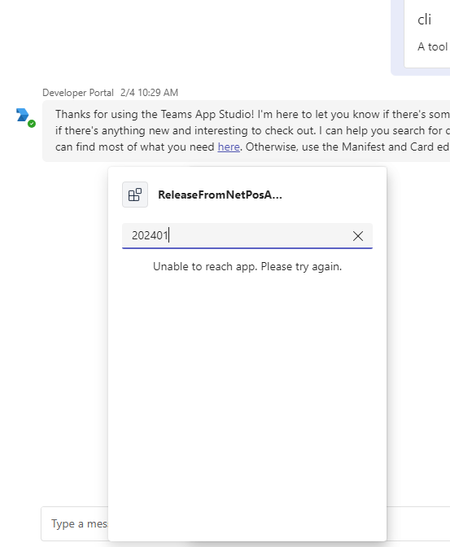
Message extension based on API throwing "Unable to reach app. Please try again."

 Microsoft
We will look into it and let you know the updates.
- ChetanSharma-msftFeb 12, 2024
Hello SatBhat - We have followed all the steps mentioned in this documentation and it is working fine for us: https://learn.microsoft.com/en-us/microsoftteams/platform/sbs-api-me-ttk?tabs=vscode%2Cviscode
Please verify if you have provisioned your application before debugging the code.
Please refer this issue: https://github.com/MicrosoftDocs/msteams-docs/issues/10370 SatBhatFeb 12, 2024Copper ContributorHi ChetanSharma-msft thanks for looking into this.
I figured out that I had to manually click on Provision. Without that my message extension wasn’t getting listed at all. Once I started manually provisioning I started seeing the message extension in the list, but was getting that 'Unable to reach...' error
1) What change you had to do to resolve that issue of getting NA/NA in search result?
2) When I changed the openapi:3.0.1 to 3.1.0 I was getting below error while provisioning.
[m365.UnhandledError]: An unexpected error has occurred while performing the M365 task. {"message":"Request failed with status code 400","detail":"{\"error\":{\"code\":\"BadRequest\",\"message\":\"OpenAPI specification version '3.1.0' is not supported.\"}}","tracingId":"00-508e6fd14f9aebfd1f6b96273433def0-8d2e04ed3b95ed46-00"}
So stayed with 3.0.1 although it was highlighting error around this version. Could that be the cause for the issue "Unable to reach app. Please try again."
My teams tool kit version is 5.4.1
3) You ok to share .zip file that was produced when you followed below step by step guide? I would like to compare it with my set of files
https://learn.microsoft.com/en-us/microsoftteams/platform/sbs-api-me-ttk?tabs=vscode%2Cviscode
Once again thanks for your help with this.
Thanks- ChetanSharma-msftFeb 12, 2024
Hello SatBhat - Please find below comments on your queries:
1) Regarding NA/NA => We are getting this because of the configuration done in the "previewCardTemplate" like below and we are not getting top level values in the result of API call:
Even if we are getting NA/NA in search result, if you select and post it in the Teams, you will be able to see the actual results.
You may need to update the logic and map the data if we will be able to get those values:"previewCardTemplate": {"title": "${if(name, name, 'N/A')}","subtitle": "${if(opentools_url, opentools_url, 'N/A')}"}
2) Please use same 3.0.1 version rather than 3.1.0. Also, I am also using same version and getting proper results:
3) Your zip package should contain all of below files:
Please find below JSON file:{ "$schema": "https://developer.microsoft.com/json-schemas/teams/vDevPreview/MicrosoftTeams.schema.json", "manifestVersion": "devPreview", "version": "1.0.0", "id": "55048865-a475-46c3-b91d-649c10f0ff1a", "packageName": "com.microsoft.teams.extension", "developer": { "name": "Teams App, Inc.", "websiteUrl": "https://www.example.com", "privacyUrl": "https://www.example.com/termofuse", "termsOfUseUrl": "https://www.example.com/privacy" }, "icons": { "color": "color.png", "outline": "outline.png" }, "name": { "short": "api-medev", "full": "Full name for api-me" }, "description": { "short": "OpenTools Plugin", "full": "A plugin that allows the user to find the most appropriate AI tools for their use cases, with their pricing information." }, "accentColor": "#FFFFFF", "composeExtensions": [ { "composeExtensionType": "apiBased", "apiSpecificationFile": "apiSpecificationFiles/openapi.yaml", "commands": [ { "context": [ "compose" ], "type": "query", "title": "Search for AI Tools", "id": "searchTools", "parameters": [ { "name": "search", "title": "Search", "description": "Used to search for AI tools by their category based on the keywords. For example, ?search=\"tool to create music\" will give tools" } ], "description": "", "apiResponseRenderingTemplateFile": "responseTemplates/searchTools.json" } ] } ], "permissions": [ "identity", "messageTeamMembers" ], "validDomains": [] }