Forum Discussion

"Manifest parsing has failed." in Developer Portal
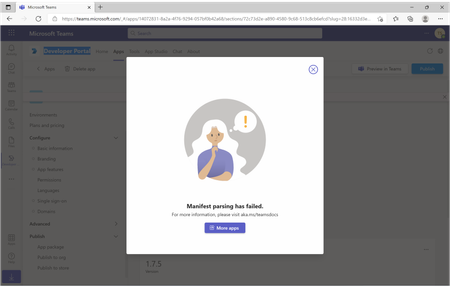
 Mar 07, 2022karamem0-We are able to repro that issue , We have raised bug for the same and concerned team is looking into it. We will inform you once we get any update.

 Microsoft
Sayali-MSFT - This entire thread is about how the "Preview in Teams" button fails.
My experience since the beginning of this thread remains the same. A perfectly working custom app with no errors cannot be tested via "Preview in Teams". As suggested earlier in this thread - the workaround is to download the app package from Developer Portal and then Upload as custom app in Teams. This works fine. We'd like the Preview in Teams button to work or be removed. It's causing confusion.
See screenshots when pressing Preview in Teams (same as the first post in this thread.
It's still not working.
MicrosoftErik Olsson -Engineering team working on this, It will take time to fix. So, workaround this, Use Developer portal.
Reference Video: https://youtu.be/B9S_nwj6vPA
- Erik OlssonSep 06, 2022I can also confirm that the Developer Portal app in Teams browser shows exact same info as the Developer Portal at https://dev.teams.microsoft.com/ That's good and as expected 👍. Have not compared with the Teams Desktop client yet. Sad to hear about the differences Lukáš Nešpor ☹️
 Lukáš NešporSep 05, 2022Copper Contributor
Sayali-MSFT This Developer portal, you mentioned, does not display my apps. I can see only one with really old configuration (no icon, different version, different domain etc.). The rest of apps are not there.
Developer portal directly in Teams behaves differently in Teams App and in Teams in browser.
Windows Teams App (correct list of apps)
Windows Teams App
Teams in Browser (missing apps)
Teams in browser
As you can see first app on both screenshots is the same (by App ID) but with different version and updated date. App was renamed but it is published with the same App ID. Btw. Teams in browser display same data as https://dev.teams.microsoft.com/.