Forum Discussion

How to highlight app icon when open a deep link to Teams app static tab by adaptive card

Yuankun_Li
Can you please check the configuration of your deeplink, also are you observing this behavior in Teams Web or only desktop client?
 Yuankun_LiMay 15, 2024Copper Contributor
Thanks so much for your reply~
This behavior happens both in Teams Web and desktop client.And I checked the ${appid} and the ${entityId} are both correct~
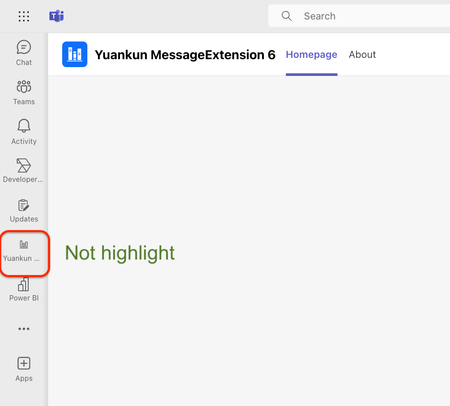
Open Teams app tab successfully with the right link, but the app icon on the left sidebar is not highlighted.
The deep link is like:
https://teams.microsoft.com/l/entity/${appid}/${entityId}?webUrl=${contentUrl}&context=${context}This app i upload to our teams organization,
For the https://teams.microsoft.com/l/entity/${appid}/${entityId}?webUrl=${contentUrl}&context=${context I used the id in the manifest.json, is it right?
 miguelnogueiraJun 15, 2024Copper ContributorI'm having the same problem. Did you find a solution?
- Yuankun_LiJun 16, 2024Copper Contributor
I fixed it to replace the https://teams.microsoft.com/l/entity/$%7Bappid%7D/$%7BentityId%7D?webUrl=${contentUrl}&context=${context which I used the `id` in the manifest.json to the `org catalog ID`.
when the app uploaded to teams organization, it will generate a new org catalog ID for this teams app.
It took me a long time to find out.
The deep link is like:
https://teams.microsoft.com/l/entity/$%7Bappid%7D/$%7BentityId%7D?webUrl=${contentUrl}&context=${context}