Forum Discussion

Surface hub 2s Teams update issue

RobinRonholtMeanwhile I opened a case myself and was advised to turn off „Set Time/Date automatically“ and then back on. It seems that automatic updates/downloads will not work properly if there is a few minutes difference because the Hub lost connection to the timeserver.

 PaulGregoryNetDec 14, 2023Copper Contributor
Hi
I have a client with the same issue.
We have rebuilt 2 Surface Hubs to get us to our new configuration, registered with Entra ID rather than on-premises AD.
Windows Update works fine, it connects and pulls the updates we need. We have the three specific KBs mentioned in this article that essentially move us from the traditional UWP app to the moderm Teams Rooms on Surface Hub:
https://learn.microsoft.com/en-us/surface-hub/surface-hub-teams-rooms
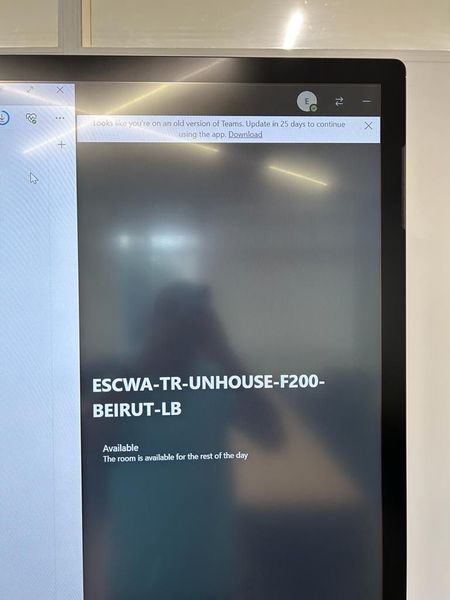
The problem is that we now see the message as per the image that olana1860 shared at the top of this post, and of course an exe file is not valid on Windows 10 Team Edition so when we download it it will not run.
I have an open ticket, but am not getting any progress, so was curious to know if anyone here had any more information, and am specifically interested to know if Teams continued to work for RobinRonholt once the countdown timer expired?
Thanks
Paul
- RobinRonholtDec 14, 2023Copper ContributorHi Paul
The "Looks like You are using old version of Teams, Update in 2x days, too keep using the app " message disappeared from all our Surface Hubs when there was a little more than 2 weeks count down left. Why and how I do not know. I think the same must have happened for Olana. I hope the same for your devices. Regards Robin- PaulGregoryNetDec 14, 2023Copper ContributorThanks for replying,
I will keep looking for an answer with the Microsoft contacts that I have available to me, and will let you know what (if anything) I manage to find.
Just to check - is Teams on Surface Hub still working OK on all of your devices?