Forum Discussion

Surface Hub 2 showing "cannot access contacts"
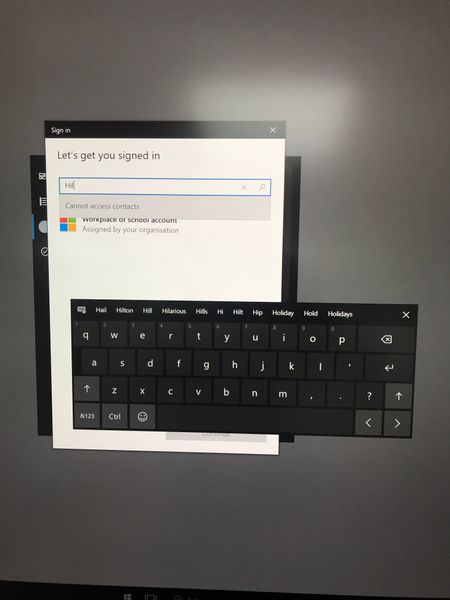

Mauro Perego I know I am more than 1 year late, but I ran into the same issue last week and could not find a clear answer online. I hope this saves some time for someone who has recently had the same issue.
I am leaving these 2 links about the Reset/First-time setup of the HUB because it was part of my troubleshooting.
https://learn.microsoft.com/en-us/surface-hub/device-reset-surface-hub
https://learn.microsoft.com/en-us/surface-hub/first-run-program-surface-hub
I want to clarify that we don't add the Surface HUB to Active Directory but use an account created in Azure AD. So when setting the admin accounts on the HUB we select: Microsoft Azure Active Directory.
At point 7 of the guide for the First Time Setup (see above link), when asked for the Device Account info, select "Skip and continue" because we were receiving an error message that the account could not be found. (Someone reported that adding the version with the extension @domain.onmicrosoft.com work. It did not work for me)
Now the HUB is ready and you can log in, but it will still show "Cannot access contacts."
https://learn.microsoft.com/en-us/surface-hub/windows-10-team-known-issues
Issue | Description | Remedy |
Adding a device account with an Exchange Online mailbox may fail during the https://learn.microsoft.com/en-us/surface-hub/first-run-program-surface-hub. | Exchange Online began disabling basic authentication for all protocols as of October 1st, 2022.
Windows 10 Team edition does fully support modern authentication, but only as of https://support.microsoft.com/help/5010415 (or a subsequent Windows CU). | One of the following options can be used to address this scenario: - Download the latest https://aka.ms/SRI and follow the https://learn.microsoft.com/en-us/surface-hub/surface-hub-2s-recover-reset#recover-surface-hub-2s-by-using-a-usb-recovery-drive to update your Surface Hub and go through the first-run experience again. - Skip setting up a device account in the first-run process, install all Windows Updates afterwards, and then add the account from Settings > Surface Hub > Accounts. - Follow the https://aka.ms/EXOBasicAuthLatest for the Exchange Web Services (EWS) protocol. |
As per the tab above, It is important to RUN WINDOWS UPDATE and then add the device account under Settings / Admin / Surface HUB / Accounts.
This will fix the issue.
I hope this will help.
Have a great day!
- Petri-XNov 11, 2022Bronze Contributor
Isn't that a problem that you have not been sign-in as it says on topic? So one propose is, select the "Workplace or School account" at first, then from bottom, select [Continue].
After that it most likely asks your credentials.
- LeonalxNov 11, 2022Copper ContributorNo, it is not a problem because it should find your contact to sign in. You still need to add an account to the HUB under "Settings / Admin / Surface HUB / Accounts"
Selecting "Workplace or School account" and selecting continue will work but it is not what Mauro was trying to achieve. Also, I find it annoying to enter the full email address when the HUB has the function to search the contacts.
