Forum Discussion

How to configure /change the start screen menue of HUB 2s
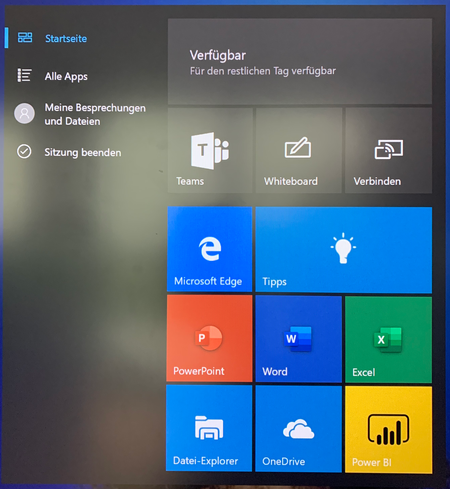
- Jan 06, 2020
Sales4C glad to hear it!


 Microsoft
Hello Ron,
Thank you for the wishes and I send you the same good thoughts!
In order to push the xml file to the device, you will first need to enroll it in Intune first. Once the device is synced, you can create a policy and assign it to the device as described here. If it's easier for you, I can reopen the case and work with you or ask the previous engineer to do the same.
Best regards,
Cezar

cezarcretu hi, which (7.) Select **Device restrictions for the profile type ... i have to select in intunes?
a) device restrictions or
b) device restrictions (Windows 10 Teams)?
Why i'm asking ... with the type Windows 10 Teams i don't have the option to 'import the XML file' ...
Greetings and THX
- cezarcretuJan 06, 2020
That's correct, you should select the "Device restrictions" or "Custom" option under Profile types. If you select Custom, be sure to add the OMA-URI: ./User/Vendor/MSFT/Policy/Config/Start/StartLayout
It should look like this:
 MarcIcoMay 25, 2021Copper Contributor
Cezar, When deploying a custom start menu using the same method as above i see an error 'Not applicable' Struggling to get our custom layout to apply after many weeks of investigation and a fast track session we are still at square one.
Within the overview Profile Assignment status - Windows 10 and later devices (Not applicable)
I don't suppose you have any ideas what could be causing this?
- Sales4CJan 06, 2020Brass Contributor
cezarcretu it works !! THANK you so much 😉
- cezarcretuJan 06, 2020
Sales4C glad to hear it!