Forum Discussion

PankajNagesh6349
Jul 12, 2023Copper Contributor
Help needed from you experts
Hello community, Greetings ! I urgently need to convert these data into excel, my boss gave the work to me 2 weeks ago. I'm currently puting the data in excel manually but at this pace I'm sure that...

PankajNagesh6349
Jul 13, 2023Copper Contributor
Ehsan_G thanks for asking,
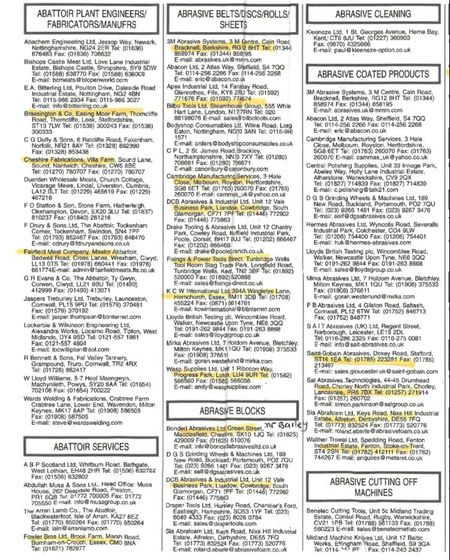
actually the file is in .jpg format for example let's suppose there a telephone directory of about 600 pages, so the data I'm having is the copy of that directory in image format which I'm supposed to convert into excel format.
Converting this
Into this

H2O
Jul 13, 2023Iron Contributor
You're right, the data source in the post you linked is a JPG file. This means that the data is not in a text format that can be easily imported into Excel.
One way to solve this problem is to use an online tool that can convert JPG files to Excel. There are a number of free and paid tools available, such as:
* Nanonets.com
* Aspose
* CloudConvert
These tools will allow you to upload your JPG file and convert it to an Excel spreadsheet. You can then open the Excel spreadsheet in Excel and format it as needed.
Another way to solve this problem is to use a third-party tool that can extract data from JPG files. There are a number of tools available, such as:
* Microsoft Power Automate
* Zapier
* IFTTT
These tools allow you to create workflows that automate the extraction of data from JPG files. For example, you could create a workflow that automatically extracts data from a JPG file and imports it into Excel every time the file is updated.
The best method for you will depend on your specific needs and preferences. If you are looking for a quick and easy solution, then using an online tool is a good option. If you are looking for a more automated solution, then using a third-party tool is a good option.
Here are some additional tips for automating the conversion of JPG files to Excel:
* Make sure that the JPG file contains the data you want to import into Excel.
* Use a tool that supports the format of the JPG file.
* Test the tool to make sure that it is working properly.
* Save the Excel spreadsheet in a safe location.
One way to solve this problem is to use an online tool that can convert JPG files to Excel. There are a number of free and paid tools available, such as:
* Nanonets.com
* Aspose
* CloudConvert
These tools will allow you to upload your JPG file and convert it to an Excel spreadsheet. You can then open the Excel spreadsheet in Excel and format it as needed.
Another way to solve this problem is to use a third-party tool that can extract data from JPG files. There are a number of tools available, such as:
* Microsoft Power Automate
* Zapier
* IFTTT
These tools allow you to create workflows that automate the extraction of data from JPG files. For example, you could create a workflow that automatically extracts data from a JPG file and imports it into Excel every time the file is updated.
The best method for you will depend on your specific needs and preferences. If you are looking for a quick and easy solution, then using an online tool is a good option. If you are looking for a more automated solution, then using a third-party tool is a good option.
Here are some additional tips for automating the conversion of JPG files to Excel:
* Make sure that the JPG file contains the data you want to import into Excel.
* Use a tool that supports the format of the JPG file.
* Test the tool to make sure that it is working properly.
* Save the Excel spreadsheet in a safe location.