Forum Discussion

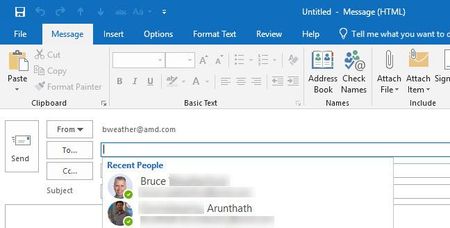
Clicking on To: filed to get common email address

Hi Bruce,
before uninstall/reconfiguration of Microsoft outlook. you should take a backup or rename 'RoamCache' file which is used very latest(see from last used in explorer Tab)
To go to the RoamCache Please follow this instruction....
IMPORTANT : Uninstall then backup of RoamCache. outlook Profile reconfiguration then rename of RoamCache.
But still after uninstall of MS office you have to perform the below instruction. to get back all address book while typing/focusing on TO: or Cc:
1.Open Outlook->choose file option->click account settings-> select account settings->
on the next pop-up select 'Data Files' focus on the account then select 'open file location'
you will be redirected to the file location where outlook data will be stored regularly.
2.Open RoamCache Folder sort according to the date [ note : you have to select use of latest one, HINT: file size of that RoamCache file will be larger size compared to others.
3. Rename the selected RoamCache file by adding any character/numbers at last.[note: you have to rename it back as it was before/original. after new outlook configuration, so do it carefully]
4. create outlook profile, perform the Step 1 given above then rename the RoamCache back to the original file name. after successful creation of outlook.
this method works successfully in-case of outlook profile recreation
incase of in-installation of MS office. before restart you have to take backup of roamcache which will be available at this location
%appdata%->local->Microsoft->outlook->roamCache.
HOPE THIS SOLUTION WILL WORK 100%.... incase of any doubts please reply back to this post.
Thanks
Kiran
- Bruce WeatherfordApr 19, 2018Iron ContributorThanks Kiran. But is the roamCache only used when you START typing an email address as opposed to just clicking on the To: field and getting populated? That last feature started working after an Outlook update so it's not clear to me that backing up the roamCache would restore it on a re-install. Thanks, Bruce...
- Apr 21, 2018
What version and build (File > Office Account) are you running? I'm on Insider Fast, running Version1805 (9312.2008), and I get the Recent People list clicking either To: or CC: fields, it may be specific to the build you have.

