Forum Discussion

SharePoint Permission for guest users through security groups
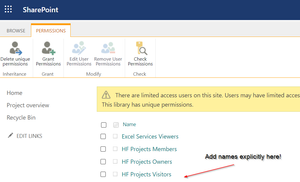

sfroehlich_aza , David_Elsner I have run into the same issue, what I have narrowed it down to is that if users are 'members' in Azure, it works as expected, if users are 'guests' in Azure, SharePoint does not see them in the AD Group and they have to be added manually.
I currently have a ticket with Microsoft to investigate.
I have a back up plan using Power Automate to 'get all members' from a dynamic AD group in Azure and 'add them' to a Scurity group in SharePoint, messy, but it does seem to work.

carlsmith Did you ever get anywhere with Microsoft?
Cant get it to work myself
 MarcoGaribayJul 29, 2024Copper ContributorHi carlsmith
I have a similar issue by adding a "guest" to a SharePoint security group. A guest is not able to access the contents of a shared folder where the guest is a member of a SharePoint security group that has read access to that shared folder.
Would that be the same behavior as with the AD Groups?
Does adding guests as Members in Azure means convert them (from guest) to "internal users"?
Regards.- carlsmithJun 25, 2024Copper Contributor
Yes, I did !
In short having someone as a 'Guest' in AD does not allow you to add them to a, AD Group!
You need to either add them as a 'Member' in Azure, or manually add them as individual users