Forum Discussion

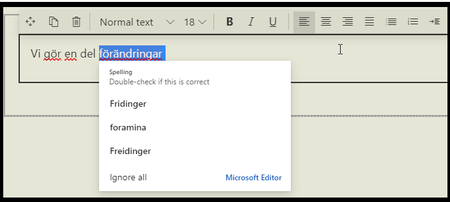
Sharepoint Online uses MS Editor for spell checking, gets errors with Swedish text
 Apr 28, 2022Maybe you already know but just in case you would like to disable de spell checking, I just discover there is an option in the SharePoint page information panel.


We have tested different browsers
We have tested different computer
We have tested MS Editor extension installed, On and Off
We have tested without MS editor exension
All this the but the users still gets the problem, and Im not able to reproduce it on my computer with my account.
The page that we have created is in english (cannont be changed be design). Language in our browser is 1. Swedish 2 English , 3 English
- MartinLaplanteMar 15, 2022Iron Contributor
I have spent far too much time on this, with about 20 breakpoints in the JavaScript seeing what the code looks for and then testing for it. Unfortunately I sometimes get different results by re-running the same page.
There is definitely a difference with the extension on or off. With the extension on, it is willing to recognize more than one language and to respect the language-specific configuration of the extension, but those languages must be among the top 3 browser languages.
There is a fair bit of processing dedicated to the language of Topic type Communication pages the multilingual feature enabled. Within it, but sometimes elsewhere, it looks for a cookie called "siteLangPref" to override the language selection. As I mentioned elsewhere, this is the cookie that is set when you select the dropdown language list on multilingual sites (note: never use that selector, it has too many side effects). When it is set, it often returns the "wrong" language code, one that does not correspond to the actual language.
With a little tinkering you can change which one language it will ignore if it is spelled correctly, but it will give squiggles for the other languages. Without the extension, I have not found a way to make it accept more than one language.
I wonder whether it is like the Teams spell checker, where you have to have installed the dictionaries in the local workstation version of Office.
- plagaceApr 28, 2022Copper ContributorMaybe you already know but just in case you would like to disable de spell checking, I just discover there is an option in the SharePoint page information panel.
- Micke640Apr 28, 2022Brass ContributorHavent seen this one before, but from what i have tested IT WORKS!
- Micke640Mar 17, 2022Brass ContributorHi
Did you see my post above (feedback portal)?
Did you find out how to fix this, or is this a teory that you have?