Forum Discussion

María José Pedreira
Jan 22, 2018Brass Contributor
Search results for office documents
I have a docx file named "Manual de usuario.docx"
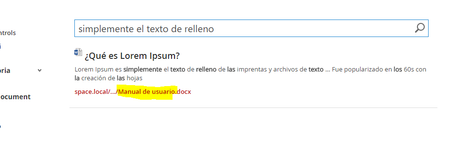
If I perform a search by the document content ("simplemente el texto de relleno") or by the document name ("manual de usuario"), by default the res...

Jan 22, 2018
You can do this by creating custom display templates in case you are using a classic search center you have created in SPO. Note you cannot do this in two scenarios:
(1) Modern search experiences
(2) Default serch for any SPO site that is not using a custom search center and it's using just SPO "System" pages (the ones that live in the layouts folder)
(1) Modern search experiences
(2) Default serch for any SPO site that is not using a custom search center and it's using just SPO "System" pages (the ones that live in the layouts folder)

María José Pedreira
Jan 23, 2018Brass Contributor
Hello again, I'm using 2016...
I wonder if is it possible to make quick changes to the default configuration of the results? I would like to avoid create new display templates....
- Mikael SvensonMay 07, 2018Steel ContributorYou can "hack" the default templates and I have a post on it, but don't do it. Do it properly, and it will work :)
- María José PedreiraMay 07, 2018Brass Contributor
Mikael Svenson, could you recommend a post for customize these results? Thanks
- Mikael SvensonMay 07, 2018Steel Contributorhttp://lmgtfy.com/?q=Custom+display+templates+sharepoint ;) tons of tutorials on this. My hacky one is at https://www.techmikael.com/2017/07/adding-custom-managed-properties-to.html
