Forum Discussion

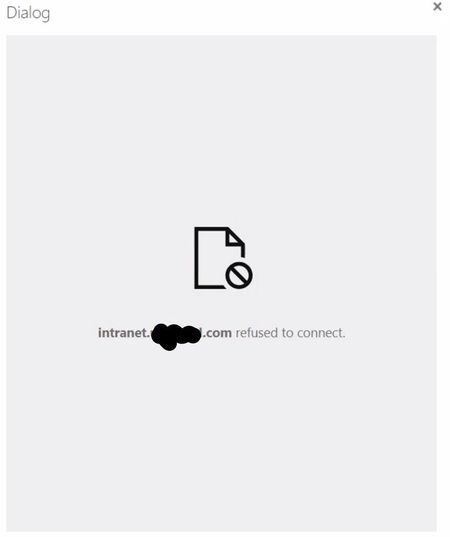
"Refused to connect" error when tyring to add SP Store app in SharePoint 2019
 Apr 04, 2022
I managed to resolve this by installing the app via PowerShell. I found an install script that came with the app when it was on CodePlex. The app is the Corporate News app. CodePlex is gone but the script is archived on the Wayback Machine (archive.org). The script is a generic script that can be modified to install any app.
Since the app can be installed via PowerShell I suspect that the issue lies somewhere with the web browser or local machine security configuration. But I'm not sure about that, it's possible that SSL is required for installing apps from the app store (the SP2016 farm I'm working in is not configured for HTTPS).
Here is the URL for the app archive on archive.org where the script can be found. I'm not sure how long it will remain there https://web.archive.org/web/20210630213220/https://archive.codeplex.com/?p=corporatenewsapp.
Here is the actual script. Hopefully it will remain here over the long run to help others out. Remember, if you aren't trying to install the Corporate News app you will have to slightly modify the script to install your app package.
param ( [string]$Web = $(throw '- Need a SharePoint web site URL (e.g. "http://mysp15site/")'), [string]$Source = "ObjectModel" ) Write-Host -ForegroundColor White "----------------------------------" Write-Host -ForegroundColor White "| Corporate News App Installer |" Write-Host -ForegroundColor White "----------------------------------" Write-Host -ForegroundColor White "- " #Global vars $AppPackageName = "CorporateNewsApp.app"; #Loads powershell settings Write-Host -ForegroundColor White "- Load Powershell context.." $0 = $myInvocation.MyCommand.Definition $dp0 = [System.IO.Path]::GetDirectoryName($0) #Loads the SharePoint snapin Write-Host -ForegroundColor White "- Load SharePoint context.." $ver = $host | select version if ($ver.Version.Major -gt 1) {$host.Runspace.ThreadOptions = "ReuseThread"} if ((Get-PSSnapin "Microsoft.SharePoint.PowerShell" -ErrorAction SilentlyContinue) -eq $null) { Add-PSSnapin "Microsoft.SharePoint.PowerShell"; } [void][System.Reflection.Assembly]::Load("Microsoft.SharePoint, Version=15.0.0.0, Culture=neutral, PublicKeyToken=71e9bce111e9429c") #Imports the App package Write-Host -ForegroundColor White "- Import app package '$AppPackageName'..." $appPath = $dp0 + "\" + $AppPackageName; if ($Source.Equals("ObjectModel", [System.StringComparison]::InvariantCultureIgnoreCase)) { $sourceApp = ([microsoft.sharepoint.administration.spappsource]::ObjectModel); } elseif ($Source.Equals("Marketplace", [System.StringComparison]::InvariantCultureIgnoreCase)) { $sourceApp = ([microsoft.sharepoint.administration.spappsource]::Marketplace); } elseif ($Source.Equals("CorporateCatalog", [System.StringComparison]::InvariantCultureIgnoreCase)) { $sourceApp = ([microsoft.sharepoint.administration.spappsource]::CorporateCatalog); } elseif ($Source.Equals("DeveloperSite", [System.StringComparison]::InvariantCultureIgnoreCase)) { $sourceApp = ([microsoft.sharepoint.administration.spappsource]::DeveloperSite); } elseif ($Source.Equals("RemoteObjectModel", [System.StringComparison]::InvariantCultureIgnoreCase)) { $sourceApp = ([microsoft.sharepoint.administration.spappsource]::RemoteObjectModel); } $spapp = Import-SPAppPackage -Path "$appPath" -Site $Web -Source $sourceApp -Confirm:$false -ErrorAction SilentlyContinue -ErrorVariable err; if ($err -or ($spapp -eq $null)) { Write-Host -ForegroundColor Yellow "- An error occured during app import !" throw $err; } Write-Host -ForegroundColor White "- Package imported with success." #Installs the App Write-Host -ForegroundColor White "- Install the APP in web site..." $app = Install-SPApp -Web $Web -Identity $spapp -Confirm:$false -ErrorAction SilentlyContinue -ErrorVariable err; if ($err -or ($app -eq $null)) { Write-Host -ForegroundColor Yellow "- An error occured during app installation !" throw $err; } $AppName = $app.Title; Write-Host -ForegroundColor White "- App '$AppName' registered, please wait during installation..." $appInstance = Get-SPAppInstance -Web $Web | where-object {$_.Title -eq $AppName}; $counter = 1; $maximum = 150; $sleeptime = 2; Write-Host -ForegroundColor White "- Please wait..." -NoNewline; while (($appInstance.Status -eq ([Microsoft.SharePoint.Administration.SPAppInstanceStatus]::Installing)) -and ($counter -lt $maximum)) { Write-Host -ForegroundColor White "." -NoNewline; sleep $sleeptime; $counter++; $appInstance = Get-SPAppInstance -Web $Web | where-object {$_.Title -eq $AppName} } Write-Host -ForegroundColor White "."; if ($appInstance.Status -eq [Microsoft.SharePoint.Administration.SPAppInstanceStatus]::Installed) { Write-Host -ForegroundColor White "- The App was successfully installed."; $appUrl = $appInstance.AppWebFullUrl; Write-Host -ForegroundColor White "- The App is now available at '$appUrl'."; Write-Host -ForegroundColor White "- (Don't forget to add app host name in your host file if necessary...)."; Write-Host -ForegroundColor White "- " } else { Write-Host -ForegroundColor Yellow "- An unknown error has occured during app installation. Read SharePoint log for more information."; }mattengel1- I hope this helps you out if you haven't already resolved your install issue.
Derek Nishino
Nishino Consulting

DerekN Encountering the exact same problem. Hoping someone has a solution soon...
- DerekNApr 04, 2022Tin Contributor
I managed to resolve this by installing the app via PowerShell. I found an install script that came with the app when it was on CodePlex. The app is the Corporate News app. CodePlex is gone but the script is archived on the Wayback Machine (archive.org). The script is a generic script that can be modified to install any app.
Since the app can be installed via PowerShell I suspect that the issue lies somewhere with the web browser or local machine security configuration. But I'm not sure about that, it's possible that SSL is required for installing apps from the app store (the SP2016 farm I'm working in is not configured for HTTPS).
Here is the URL for the app archive on archive.org where the script can be found. I'm not sure how long it will remain there https://web.archive.org/web/20210630213220/https://archive.codeplex.com/?p=corporatenewsapp.
Here is the actual script. Hopefully it will remain here over the long run to help others out. Remember, if you aren't trying to install the Corporate News app you will have to slightly modify the script to install your app package.
param ( [string]$Web = $(throw '- Need a SharePoint web site URL (e.g. "http://mysp15site/")'), [string]$Source = "ObjectModel" ) Write-Host -ForegroundColor White "----------------------------------" Write-Host -ForegroundColor White "| Corporate News App Installer |" Write-Host -ForegroundColor White "----------------------------------" Write-Host -ForegroundColor White "- " #Global vars $AppPackageName = "CorporateNewsApp.app"; #Loads powershell settings Write-Host -ForegroundColor White "- Load Powershell context.." $0 = $myInvocation.MyCommand.Definition $dp0 = [System.IO.Path]::GetDirectoryName($0) #Loads the SharePoint snapin Write-Host -ForegroundColor White "- Load SharePoint context.." $ver = $host | select version if ($ver.Version.Major -gt 1) {$host.Runspace.ThreadOptions = "ReuseThread"} if ((Get-PSSnapin "Microsoft.SharePoint.PowerShell" -ErrorAction SilentlyContinue) -eq $null) { Add-PSSnapin "Microsoft.SharePoint.PowerShell"; } [void][System.Reflection.Assembly]::Load("Microsoft.SharePoint, Version=15.0.0.0, Culture=neutral, PublicKeyToken=71e9bce111e9429c") #Imports the App package Write-Host -ForegroundColor White "- Import app package '$AppPackageName'..." $appPath = $dp0 + "\" + $AppPackageName; if ($Source.Equals("ObjectModel", [System.StringComparison]::InvariantCultureIgnoreCase)) { $sourceApp = ([microsoft.sharepoint.administration.spappsource]::ObjectModel); } elseif ($Source.Equals("Marketplace", [System.StringComparison]::InvariantCultureIgnoreCase)) { $sourceApp = ([microsoft.sharepoint.administration.spappsource]::Marketplace); } elseif ($Source.Equals("CorporateCatalog", [System.StringComparison]::InvariantCultureIgnoreCase)) { $sourceApp = ([microsoft.sharepoint.administration.spappsource]::CorporateCatalog); } elseif ($Source.Equals("DeveloperSite", [System.StringComparison]::InvariantCultureIgnoreCase)) { $sourceApp = ([microsoft.sharepoint.administration.spappsource]::DeveloperSite); } elseif ($Source.Equals("RemoteObjectModel", [System.StringComparison]::InvariantCultureIgnoreCase)) { $sourceApp = ([microsoft.sharepoint.administration.spappsource]::RemoteObjectModel); } $spapp = Import-SPAppPackage -Path "$appPath" -Site $Web -Source $sourceApp -Confirm:$false -ErrorAction SilentlyContinue -ErrorVariable err; if ($err -or ($spapp -eq $null)) { Write-Host -ForegroundColor Yellow "- An error occured during app import !" throw $err; } Write-Host -ForegroundColor White "- Package imported with success." #Installs the App Write-Host -ForegroundColor White "- Install the APP in web site..." $app = Install-SPApp -Web $Web -Identity $spapp -Confirm:$false -ErrorAction SilentlyContinue -ErrorVariable err; if ($err -or ($app -eq $null)) { Write-Host -ForegroundColor Yellow "- An error occured during app installation !" throw $err; } $AppName = $app.Title; Write-Host -ForegroundColor White "- App '$AppName' registered, please wait during installation..." $appInstance = Get-SPAppInstance -Web $Web | where-object {$_.Title -eq $AppName}; $counter = 1; $maximum = 150; $sleeptime = 2; Write-Host -ForegroundColor White "- Please wait..." -NoNewline; while (($appInstance.Status -eq ([Microsoft.SharePoint.Administration.SPAppInstanceStatus]::Installing)) -and ($counter -lt $maximum)) { Write-Host -ForegroundColor White "." -NoNewline; sleep $sleeptime; $counter++; $appInstance = Get-SPAppInstance -Web $Web | where-object {$_.Title -eq $AppName} } Write-Host -ForegroundColor White "."; if ($appInstance.Status -eq [Microsoft.SharePoint.Administration.SPAppInstanceStatus]::Installed) { Write-Host -ForegroundColor White "- The App was successfully installed."; $appUrl = $appInstance.AppWebFullUrl; Write-Host -ForegroundColor White "- The App is now available at '$appUrl'."; Write-Host -ForegroundColor White "- (Don't forget to add app host name in your host file if necessary...)."; Write-Host -ForegroundColor White "- " } else { Write-Host -ForegroundColor Yellow "- An unknown error has occured during app installation. Read SharePoint log for more information."; }mattengel1- I hope this helps you out if you haven't already resolved your install issue.
Derek Nishino
Nishino Consulting