Forum Discussion

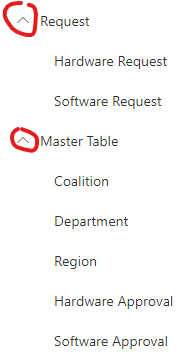
I want to modify share point left navigation
- Apr 08, 2020
Hi Elanchearn1010,
Based on the screenshot you have shared, it looks like you're trying only to remove the dropdown which comes up automatically when you create sub-links setup in modern left navigation (Quick Launch) in Modern Pages.
Currently, in the out-of-the-box Modern Left Navigation (Quick Launch), you won't be able to control and remove the header dropdown icons and in fact, if you check the F12 Developer Tools, the CSS classes of these header dropdowns are dynamic, therefore overriding may also not work in your current scenario.
For your reference, you would be able to perform the below currently with the Modern Left Navigation (Quick Launch) -
1. Enable(Show) or disable(Hide) the entire left navigation (Quick Launch)
2. Create Links and make sub-links and promote sub-links
3. Drag and move the links up, down and around, edit and delete.
I hope this is helpful, please like it or mark it as a solution if it answers your query.
Thanks.


I have tried.I am no able to remove that drop down.Where i need to check and remove that header drop down?