Forum Discussion

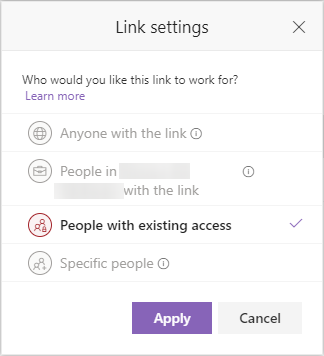
No sharing links options for folders anymore
- Jul 08, 2019
Hi Deleted,
Can you check and see if the Limited Access mode is on for this site? Thanks!
Stephen RiceOneDrive Program Manager II

Jens Balondo, thanks.
Yes, I've checked affected site collections in the admin center and with PowerShell as well. They're set to ExternalUserSharingOnly. I've just tried switching it to ExistingExternalUserSharingOnly just to see if it makes a difference but it doesn't. I wouldn't expect it to make a difference as this setting should mostly apply to external sharing stuff and we're not even able to share folders within the tenant.
What's even more strange is the following: In the classic admin center, for a given site collection you can choose no to respect the default organization setting for the default link type from within the sharing settings menu. I set it to override the organizational setting and to default to:
And what that does it indeed switch the default link type in the background but the GUI does not completely reflect the change. What it shows me is an empty box but it let's me pick the user name which suggests that it is of type "Direct"
I guess this might honestly be a bug. I will create a ticket with the MS support and keep you guys posted.
Thanks.

do you already create a new Site (Team Site) from the "new" SharePoint Admin Center and made your external Sharing Settings? Same result?
And what about Office 365 policy settings (in Sec & Comp)? Any limitations about sharing?
Regards
Jens
- DeletedJul 04, 2019Not applicable
Jens Balondo, thanks. None of those site collections I've identified thus far were created through the admin center. We've got a third party solution for that. However, they're all classic non-unified group connected team sites and, in part, a couple of years old already. So there're no policies applied.
The initial contact by the Microsoft support has not yet taken place, unfortunately.
The weird thing is that that little info message is trying to tell me that organizational settings are preventing me from selecting this option. However, as outlined in the initial screenshots, everything points to that not having to be the case.
- StephenRiceJul 08, 2019
Microsoft
Hi Deleted,
Can you check and see if the Limited Access mode is on for this site? Thanks!
Stephen RiceOneDrive Program Manager II
- DeletedJul 10, 2019Not applicable
Hi StephenRice, it was indeed the Limited-access user permission lockdown mode feature which was active on the affected sites. I was aware of that feature but I believed that it only prevented sharing folders with external users because I don't remember internal users from ever being prevented to create sharing links of the various types. Anyway, it seems solved now. Thanks Stephen!