Forum Discussion

JSON Format View for Sharepoint Modern Calendar

As far as I got that thing with the JSON calender formatting, your "operand" always has to refer to a column, as it is by default [$Title], not "now" or another date stuff, but I maybe wrong 🙂 so if you just use a calender formatting and change the JSON code on the part with [$Title] into a date column like [$due date], your other JSON code will detect, what your other conditions can fullfill then... greets from Eva.
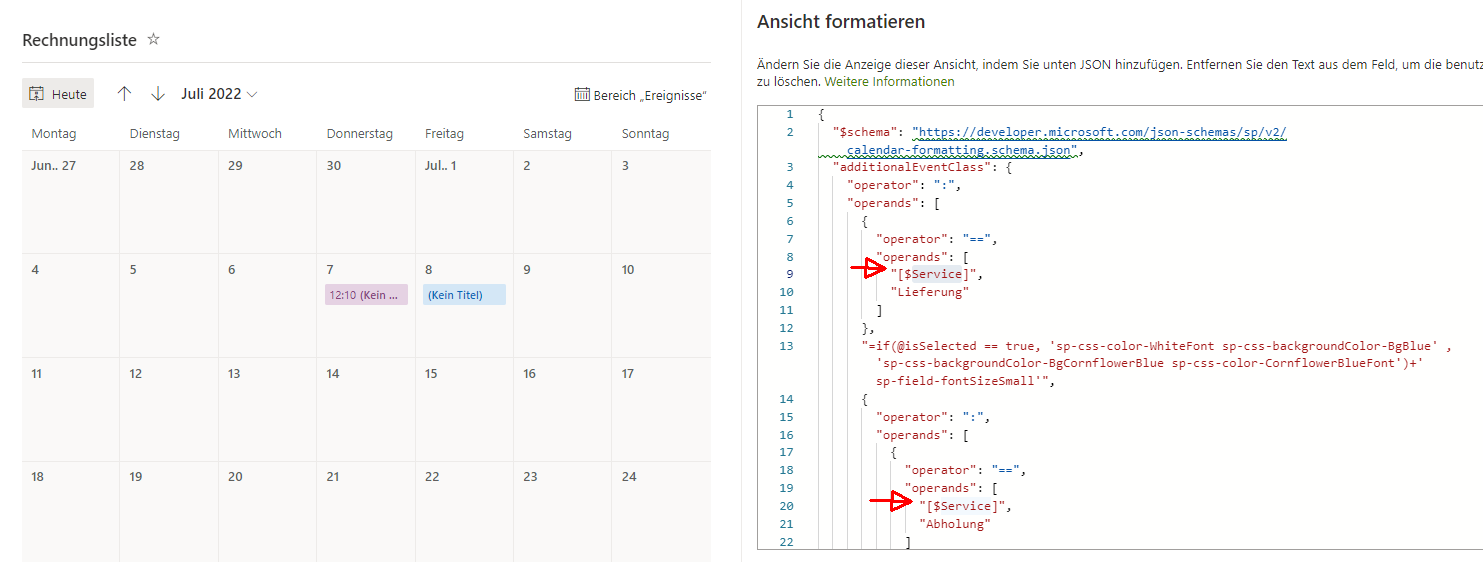
As an example, I changed the advanced mode of my JSON calender formatting from [$Title] into a choice field called [$Service] and it chose exactly between the result "Take away" (Abholung) with a lilac background, and "delivery" (Lieferung) with a blue background. Sorry, it is all in german, never mind 🙂
 as733yJul 28, 2022Tin Contributor
Hi Eva,
Thank you. I understand the JSCON calendar formatting for the choice field, I need help with referencing the [$Modified] column and formatting whether the [$Modified] column was within that day.So how to check date/time vs choice column I guess is what I'm asking 🙂