Forum Discussion

Help VMware esxi vm High CPU running SharePoint server 2019
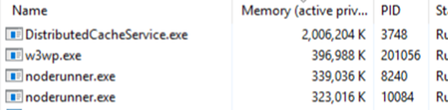

jcmfxt your issue requires bit more info:
- Which is the SharePoint Architecture topology ? Single server , Multiple Servers etc..
- Which MinRole has been assigned to the impacted server ?
The problem with SQL may be related.
It depends how you have configured the instance at the very beginning in SP:
If you used alias name than it should not be a problem, meaning you just swap the instance behind the alias at the moment of the SQL server clone and the rest is transparent for SharePoint.
If not than you have to check each SP service (MMS, Search, BDC etc...) and see where they are pointing to

- mr_w1nst0nJun 02, 2022Iron Contributor
Custom role means you are not taking benefits of the MinRole feature and you can decide every SP service startup on your own (as we are talking of a single server it's fine).
For checking the alias click on the server start and type "cliconfg.exe", the SQL Server Client Network Utility should pop up and you have the Alias tab to check whether an alias is present or not
You can match later the alias information with the Farm Information that you can find in the Servers in Farm tab in the Central Admin (/_admin/FarmServers.aspx)
To check the DB endpoint configured for the SP services, one option is to use the CA, click on "Manage Service Applications", select the SP Service then click on Properties. Another option is to use PowerShell
- jcmfxtJun 02, 2022Copper Contributor
I ran the cliconfg and there wasn't any aliases. I went to service applications and there's not an SP listed.
- mr_w1nst0nJun 03, 2022Iron Contributor
the list you provided shows all the SP services configured in your farm (and relative proxy)
You have to click on each SP service (eg. App Management Service) and then select Properties on the top bar navigation. Do it only for the service (1st line) and not for the proxy (2nd line)
A pop up should appear showing the configuration of the service itself
From there you should be able to see the name of the Database and the SQL Instance.
Check if there is any discrepancies based on what you mention about the SQL Instance clone.
Side Note: You can also check if any SP major issue by analyzing the ULS logs. There is a diagnostic tool provided by MSFT for that: https://docs.microsoft.com/en-us/sharepoint/administration/view-diagnostic-logs