Forum Discussion

Blank fields when editing an existing list element
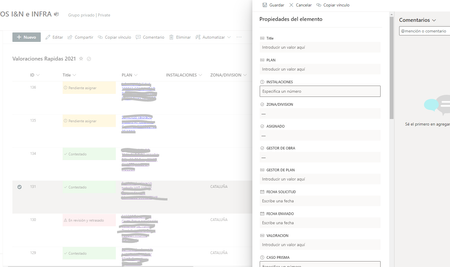

 MartaGMOct 21, 2021Tin ContributorHi Eva. Thanks for answering me.
I don't really understand what you are saying but I have the same problem in a Team where I'm the owner and the only member (is the one that I use to try things before updating the ones with other people), and I haven´t change anything there that I remember- MartaGMOct 21, 2021Tin ContributorI have just realized one thing, eventhough all the fields seem to be blank when editing, only the ones with date format maintein their value when saving.
I tried creating a new list with 2 columns (number and text) and it worked fine, then I add another column with date format and the same problem appeared.
I really don't understand anything. Is any of this ringing a bell for you?
Thanks again.
best regards, Marta- Eva VogelOct 21, 2021Steel Contributor
Hi Marta, pls. check your regional settings, like language and currency settings in your M365 Account.
Here attached 4 you to little films: first to check your permissons level in SharePoint( user15 is a Member, Me=Site Owner) and second film is about your regional settings. That includes keyboard and (!) currency settings. Maybe your Tenant was set only for English settings (reset after update?). Occasionally I have that issue, when I initialize a new Flow with Power Automate and currency Fields, then the flow settings are reset to english. Are you working with Power Automate Flows? That could be a reason.
Please make sure your Account Settings (including the Office Apps!) are in Spanish. If you cannot change these settings, pls. write a ticket to your Teams Admin.