Forum Discussion

2 errors on dropdown column in SP list
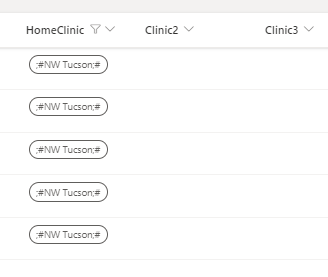
 May 18, 2023Right now, I am going to create a duplicate HomeClinic column from scratch and copy values and then delete the original homeclinic column. I know this will work.

Holly-CMS Are you using Power Apps customized list form?
Syntax for saving data using Power Apps Patch function for single selection and multiple selection choice fields is different. So, you have to adjust your customized list form and formulas accordingly after the change.
What issues you were facing with multiple selection choice column in Power automate? It is possible to add/updated values in multiple selection choice column from Power automate.
Please click Mark as Best Response & Like if my post helped you to solve your issue. This will help others to find the correct solution easily. It also closes the item. If the post was useful in other ways, please consider giving it Like.
- Holly-CMSMay 18, 2023Copper ContributorRight now, I am going to create a duplicate HomeClinic column from scratch and copy values and then delete the original homeclinic column. I know this will work.
- Holly-CMSMay 18, 2023Copper Contributor
>Power Apps customized list form - yes and I didn't even do anything to it except to move up 2 new columns. And how do I fix that?
>Power Automate - the Select Action - the dynamic values would not populate the HomeClinic 'VALUE' in the list. With that said, if I select the homeclinic from the Dynamic Values, it would output a LONG wording value....And no one in Power Automate could come up with a solution for this. So I had to get creative and create 2 more columns. The HomeClinic value finally showed up and it works well. Except weird issue popped up. I have over 3000 rows in the list and the ones you see are the only ones that are issues and not able to update.