Forum Discussion

Why is project leaving unused capacity in days?
 Nov 01, 2023Joe1250,
If there is no dependency between tasks do not create one just to make the flow easier.
I think I've given you a good foundation for setting up your Project plan. It's up to you to develop the concepts presented and go forth. It will be an iterative process, you just have to see what works best for you.
John

Hi again John-project, thanks once again for the response. I guess I sort of just figured that the asap constraint would provide that optimization, especially if the dependencies were set up? I've noticed that when playing around with very simple project/task examples, it does seem to optimize or schedule to the full daily work quota, but as I add subtasks and/or additional dependencies, it performs less well.
I would have thought that by setting the constraints to asap and setting up task dependencies, the leveling would have looked forward as well as back to start task B after task A was finished (not leaving 2 or 3 hrs in between), especially if this was all that would be needed to resolve a resource allocation...?
If that's not how it works, what are the best practices to fill these gaps? If I manually set the start time of task B to start immediately after the completion of task A, will that task still be considered as auto-scheduled? ie. If I had to insert a task somewhere before task A, would task B shift accordingly?
Best practice has all tasks as auto-scheduled and no constraints (i.e. as-soon-as-possible). Set up the plan with estimated time spans (duration) for each task and linked in a logical sequence (normally finsh-to-start). With this type of dynamic plan Project will move tasks as durations and dependencies are changed. The minute you manually enter a start date for a task, a start-no-earlier-than constraint is set and it "breaks" the dynamics. In some cases a defined start may be appropriate (e.g. a particular resource will not be available until a certain date) but that might also be controlled by resource calendars (e.g. vacation or part time worker).
If a resource is overallocated such that it, (both people and machines are work type resources), is simultaneously assigned to multiple tasks such that the Max Units for that resource are exceeded, then leveling can help resolve that overallocation. But even with leveling, manual re-structuring may be needed to relieve the overallocation problem.
Task dependencies should only be used when there is in fact a dependency. However, all tasks should have a predecessor, unless the task starts on the Project start date or there is a valid constraint (as noted above), and all tasks should have a successor, even if it is the final milestone in a plan. If a task has no successor, why is it in the plan?
Keep in mind that summary lines are NOT tasks, they are simply a summary of performance tasks, (i.e. tasks that have resources assigned to achieve a given result), under the summary.
Hope this helps.
John
- Joe1250Oct 31, 2023Copper Contributor
Thanks John-project , that was very helpful info, you might have just saved me from going down a massive dependency rabbit hole! One question on your response, you said that some degree of manual structuring may be necessary to relieve the overallocation problem... is there any method of manual restructuring that will not break the autoschedule link? ie. will allow future modifications to flow through and adjust accordingly?
So a little context; I am trying to create a project template that can accommodate projects of varying scope. This may be a futile endeavor... I'm not sure yet.
The project type is related to sending out surveys. If the location to be surveyed is small, the project would only involve a single sample set. If the location is larger, the project would involve multiple sample sets. The tasks for each sample set are the same, but if there are multiples, they can run concurrently. For example, whether there is one sample set or 10, all of the surveys would be printed at the same time, mailed at the same time, and the waiting period for responses would be say 2 weeks, beginning and ending at the same time regardless of how many sample sets there are. The duration of the tasks would obviously increase with the number of sample sets as the volume of work increases, except for the waiting period, which is a fixed duration.
My intention was to build a template with a set of sub-tasks for each potential sample set (duplicate subprojects or sub-task groups), so I was thinking maybe the template is set up for a project of 10 sample sets, then I could add or subtract subsets to suit the scope of the project.
Each task has an estimate of the amount of work attached to it, so for example preparing the surveys might be 5 hrs per sample set, so if there were 5 sample sets to be done in the project, the total work would be 25 hrs, and this process would effectively be done as a single task in that the preparer would just start with a larger list containing all of the survey participants from each of the 5 sets. They don't need to be done sequentially, but setting up the tasks to be dependent would help with ensuring the resource allocation and duration were appropriate and maybe easier to level? Any adivce on this would be very much appreciated!
The problem is that all of the dependent tasks would basically waterfall from the preceding tasks and if I wanted to use the template for a project that only required 3 sample sets, deleting the last two would mess up all the dependencies if I don't assign them all, at least as far as I can tell so far... maybe there's a way around this that I'm not aware of? I'm still experimenting here...
I hope that kind of makes sense, here's a graphic illustrating the description of what I'm trying to do... I'm still experimenting with the best way to set this up, please don't hesitate to reach out with any advice! You can see where I've gone a little crazy trying to make sure all the dependencies are set across all the subgroups... my intention was to make sure if I deleted some, the rest would remain intact...
Thanks,
Joe
- John-projectOct 31, 2023Silver ContributorJoe,
Wow, almost too much information but I gotta ask, is Snagglepus one of your resources?
Don't confuse manual structuring with manual scheduling. I probably used a wrong term. As long as all of your tasks as set as "auto-scheduled" (Task Mode field), you are good to go. When leveling is applied to help alleviate overallocations, the leveling algorithm does it's best to shift resource assignments based on how the leveling options are set. However, there are times when the algorithm just can't resolve everything. The user must first take a look at what the leveling algorithm did (sometimes it does assignment shifting that is undesireable) and then make some adjustments such as: reviewing dependencies to insure they are valid, reviewing estimated durations and work for tasks, adding more resources, eliminating tasks that may not be absolutely necessary to achieve the end goal. It all comes down to "negotiating" with the plan to reach an acceptable end result.
On your screen shot, if you remove various summary groups from the plan, the dependency structure of all remaining summary groups remains intact, BUT, you may need to add dependencies to the first task of some summary groups to regain the desired waterfall structure. Do NOT put dependencies on summary lines, it may seem like an "easy out" but it is bad practice and normally results in schedule havoc.
John- Joe1250Oct 31, 2023Copper Contributor
Hey John-project , if you're referring to the screen shot, it's a program called Snagit 🙂
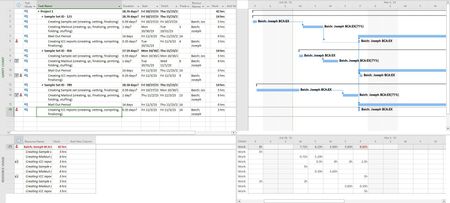
Thanks for the tips! I've gone down another rabbit hole... So the first task in subgroup 1 is the first task no matter what. If there is more than one sample set, then I'm thinking the first task in each subgroup is dependent on all the first tasks of the subgroups above it (ie. Create Mailout 1 -> Create Mailout 2 -> Create Mailout 3). So in the image below, the first task in each subgroup is "Create Sample Set" and I've set the predecessors to include all of the previous task rows for that task type... I think this is correct?
But the next part is where I'm kind of struggling... The next task type after the Samples have been created is to "Create the Mailout". So if there is more than 1 sample set, then is the logic that the predecessors flow with the task type? ie. Create Mailout 1 -> Create Mailout 2 -> Create Mailout 3...? or is it that Create Mailout 3 can be preceded by Create Mailout 1 and 2 AND Create Sample Set 3? Maybe this image will help clarify that question...
Thanks,
Joe