Forum Discussion

anthonyd1555
Aug 02, 2024Copper Contributor
Upcoming Task on 2016 (active)
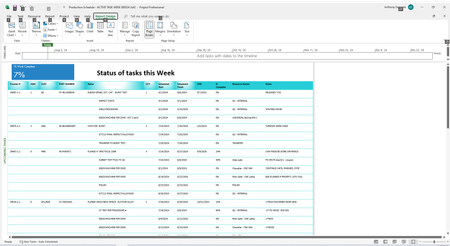
Hi All, How do I display more than 50 task, I went into Advanced options ad it say I only have 50 lines but it does say something about filters. I need to display like 150 lines for production sched...
 Aug 05, 2024Tony,
It might help if you show a screen shot of your Gantt Chart instead of the report you selected.
1. Are you just trying to display the next 2 weeks of tasks or do you need a print out?
2. Which task fields do you need to see (e.g. ID, Name, Duration, etc.)?
I think you are using the Active field for something other than it's intended purpose. The Active field is used to include or remove tasks from the current schedule, not to show or hide tasks that are ongoing, which it appears you are trying to do.
You mention the ability to display more than 50 lines. What is so important about how many task lines are displayed in the view? The number of task lines that are displayed in a view is driven be a few different factors. For example, the font size is a prime driver but other factors also come into play. Let's see what you've got and then go from there.
John
anthonyd1555
Aug 05, 2024Copper Contributor
I'm simply trying to display all Tasks 2 weeks out.
It is not Tasks starting soon which is only 1 week displayed.
I selected Active Task which I want to display only due the limitation.
How can I display more then 50 lines?
Thanks,
Tony
John-project
Aug 05, 2024Silver Contributor
Tony,
It might help if you show a screen shot of your Gantt Chart instead of the report you selected.
1. Are you just trying to display the next 2 weeks of tasks or do you need a print out?
2. Which task fields do you need to see (e.g. ID, Name, Duration, etc.)?
I think you are using the Active field for something other than it's intended purpose. The Active field is used to include or remove tasks from the current schedule, not to show or hide tasks that are ongoing, which it appears you are trying to do.
You mention the ability to display more than 50 lines. What is so important about how many task lines are displayed in the view? The number of task lines that are displayed in a view is driven be a few different factors. For example, the font size is a prime driver but other factors also come into play. Let's see what you've got and then go from there.
John
It might help if you show a screen shot of your Gantt Chart instead of the report you selected.
1. Are you just trying to display the next 2 weeks of tasks or do you need a print out?
2. Which task fields do you need to see (e.g. ID, Name, Duration, etc.)?
I think you are using the Active field for something other than it's intended purpose. The Active field is used to include or remove tasks from the current schedule, not to show or hide tasks that are ongoing, which it appears you are trying to do.
You mention the ability to display more than 50 lines. What is so important about how many task lines are displayed in the view? The number of task lines that are displayed in a view is driven be a few different factors. For example, the font size is a prime driver but other factors also come into play. Let's see what you've got and then go from there.
John