Forum Discussion

Upcoming Task on 2016 (active)
 Aug 05, 2024Tony,
It might help if you show a screen shot of your Gantt Chart instead of the report you selected.
1. Are you just trying to display the next 2 weeks of tasks or do you need a print out?
2. Which task fields do you need to see (e.g. ID, Name, Duration, etc.)?
I think you are using the Active field for something other than it's intended purpose. The Active field is used to include or remove tasks from the current schedule, not to show or hide tasks that are ongoing, which it appears you are trying to do.
You mention the ability to display more than 50 lines. What is so important about how many task lines are displayed in the view? The number of task lines that are displayed in a view is driven be a few different factors. For example, the font size is a prime driver but other factors also come into play. Let's see what you've got and then go from there.
John
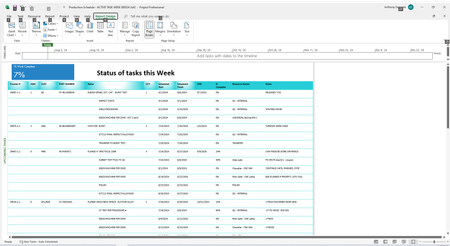
Which report are you using? Per your screen shot, it looks like you have selected or created a report that looks at list of tasks for just one week. That may be the reason you are only seeing 50 tasks.
And where exactly are you seeing the Advanced options? You apparently are using Project 2016 and I am using Project 2019 so there might be a difference.
John
- anthonyd1555Aug 05, 2024Copper Contributor
Dashboard, upcoming tasks, Active Tasks - The projects / Travelers I schedule have up to 20 plus tasks indented. Since I'm inactivating task to fit in the one report, I rather not do that, maybe different report?
I'm having to use Ascending and Descending to get 100 lines.
I really need about 120 tasks to fit in one report
File
Options
Advanced
See screen shot below, maxs at 50, does 2019 show more?
I don't want to filter, I need the end game, start to finish.
Need to plan month end, at risk report
Thanks for your reply John 🙂
I'm pretty new to project and wish to learn more.
Cheers,
Tony
- John-projectAug 05, 2024Silver Contributor
What exactly are you trying to do?
The "Upcoming Tasks" report is determined by the applied filter. By default, that filter is the "tasks starting soon" but your screen shot shows you have the "Active" filter applied.
The options setting has nothing to do with how many tasks will appear. Those settings impact only how many projects show as being previously accessed.
Again, what exactly are you trying to do?
John
- anthonyd1555Aug 05, 2024Copper Contributor
I'm simply trying to display all Tasks 2 weeks out.
It is not Tasks starting soon which is only 1 week displayed.
I selected Active Task which I want to display only due the limitation.
How can I display more then 50 lines?
Thanks,
Tony