Forum Discussion

Unable to open project plans I was previously accessing everyday
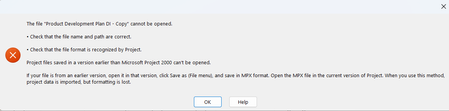

For reference which version of desktop Project are you using?
Are the problem files part of a linked structure (i.e. master file with subprojects or resource pool with sharer files)?
Where are the files stored (i.e. on a local drive or a remote server)?
If the files are NOT part of a linked structure, try this:
1. Open a new blank Project file
2. Go to Project/Insert group/Subproject and insert one of the problem files.
3. Select the first task which will be the insertion point summary line.
4. Go to Task/Properties group/Information/Advanced tab.
5. Uncheck the "Link to Project" button and hit "OK".
6. If the file isn't already expanded, expand it.
7. Select all tasks below the top level summary line.
8. Outdent the selected tasks.
9. Delete the first task which previously was a summary line.
10. Save the resulting file.
Can you now open the saved file? If so, perform this process for the other problem file.
John