Forum Discussion

Teams integration: Hiding the O365 header in project roadmaps
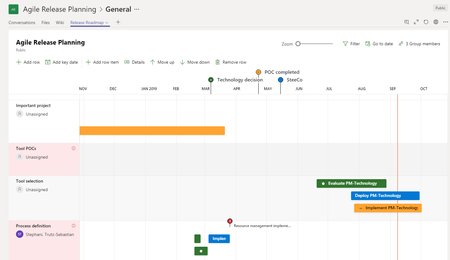

Trutz_Stephani I am asking if it will work on this url: https://project.microsoft.com/en-US/.
I already am familiar with adding it to an in individual project URL such as the one you just provided.

Hi locious ,
It seems then we both completely misunderstood each other.
The parameter doesn't work for the Project entry page, which is the URL you supplied.
 michelbehrOct 20, 2020Copper ContributorHi Trutz - I'm trying adding "dynamicsUI=true" to the URL in MS Teams and it's not working (I'm adding the project as a website app in MS Teams). Am I missing something...?
- Trutz_StephaniOct 20, 2020Steel Contributor
Hi michelbehr,
Adding the parameter with a & character after the guid of the project should be all that's needed.
Be aware that you no longer need the workaround as Microsoft released 2 apps to solve the integration.
Roadmaps and Project app for Teams integration:
New apps in Teams
Just add the apps to your teams as tabs and then select a project that you want to integrate.
- michelbehrOct 20, 2020Copper Contributor
Trutz_Stephani Thank you for your quick reply!
The 'project' app for MS Teams only works for Standard Channels, but I need to use in the context of a Private Channel, so I think I have to use the 'website' app instead, I can't see an alternative.
Regarding your reminder of adding '&', yes, that's how I'm doing it, but the header persists:
- lociousAug 03, 2020Copper Contributor
Trutz_Stephani ok i figured. Thanks!