Forum Discussion

task scheduling
 Mar 30, 2022
The problem is that you've defined a "day" as 4 hours but the custom calendar only has 3.66 days (9:00 to 11:00 is 2 hours but 11:20 to 13:00 is only 1.66 hours). Remember, non-working time (i.e. 20 min break) is not counted. Change the "To" time for each workday to show 13:20 PM as shown (Note, I don't use a 24 hour clock):
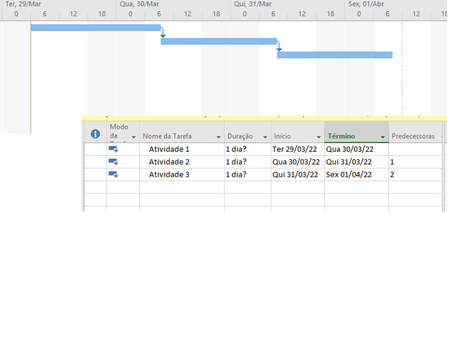
Doing that, the result will look like this as long as you also set the Gantt display to show your custom 4 hour workday calendar. Note, with this timescale setting Gantt bars are rounded to the nearest hour so you don't see the 20 minutes but I've elected to show the time in the Start and Finish fields so it is clear when a task ends.
Hope this helps.
John
The problem is that you've defined a "day" as 4 hours but the custom calendar only has 3.66 days (9:00 to 11:00 is 2 hours but 11:20 to 13:00 is only 1.66 hours). Remember, non-working time (i.e. 20 min break) is not counted. Change the "To" time for each workday to show 13:20 PM as shown (Note, I don't use a 24 hour clock):
Doing that, the result will look like this as long as you also set the Gantt display to show your custom 4 hour workday calendar. Note, with this timescale setting Gantt bars are rounded to the nearest hour so you don't see the 20 minutes but I've elected to show the time in the Start and Finish fields so it is clear when a task ends.
Hope this helps.
John
 FilipeCuangoMar 30, 2022Tin Contributor
 ....... You're absolutely right John. Thank you very much.
 - John-projectMar 31, 2022Silver ContributorFilipeCuango,
You're more than welcome and thanks for the feedback.
John