Forum Discussion

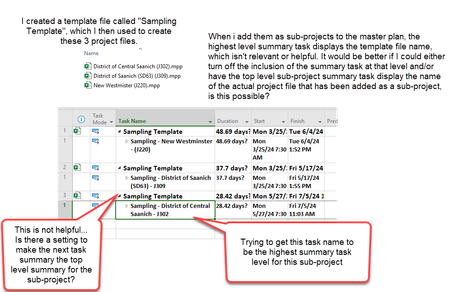
Subprojects created from template show up as the template file name when added to the master?
 Nov 07, 2023
Row 1 (ID 1) is NOT the Project Summary Task. As I noted, and showed in my screen shot, the Project Summary Task is ID 0. While in the Gantt Chart view, go to, Gantt Chart Format > Show/Hide group > "Project Summary Task".
Once you have that set to the name you want in each subproject, that name will appear at the subproject summary line insertion point in the master.
This is a screen shot of a subproject I have. Note the file name is different than the Title (Project Summary Task).
This is what that subproject looks like in my master file.
Does that clarify it for you?
John
Row 1 (ID 1) is NOT the Project Summary Task. As I noted, and showed in my screen shot, the Project Summary Task is ID 0. While in the Gantt Chart view, go to, Gantt Chart Format > Show/Hide group > "Project Summary Task".
Once you have that set to the name you want in each subproject, that name will appear at the subproject summary line insertion point in the master.
This is a screen shot of a subproject I have. Note the file name is different than the Title (Project Summary Task).
This is what that subproject looks like in my master file.
Does that clarify it for you?
John

Thanks John-project, yes that clears it up, couldn't figure out how to get to line 0 🙂
- John-projectNov 07, 2023Silver ContributorJoe,
You're more than welcome and thanks for the feedback.
John