Forum Discussion

Reuben
Jan 04, 2022Iron Contributor
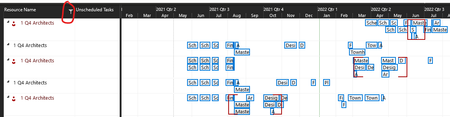
Shared Pool Resources are shown separately in Linked Project
I have created a Resource Pool and shared it to 5 different projects. I then add those projects as sub-projects to a master project. I was hoping to be able to see how the shared resources were ...
 Jan 13, 2022Reuben,
For what you want to do, yes, you should open the resource pool file and then save all when you close out.
John
John-project
Jan 05, 2022Silver Contributor
Reuben,
The screen shot you posted earlier this morning of the Resource Usage view in the master file indicates resources are coming from each subproject, not from the pool. I can't tell what you might have done such that it now works but you gave the correct answers to my questions so I think you are on the right path. But, I'll give you one more thought. When working with linked structures in Project, you can never rename, move, overwrite, or save off to another location any of the files in the structure. Ideally all files should be in a single folder on a local drive and not be operated over a network.
John
The screen shot you posted earlier this morning of the Resource Usage view in the master file indicates resources are coming from each subproject, not from the pool. I can't tell what you might have done such that it now works but you gave the correct answers to my questions so I think you are on the right path. But, I'll give you one more thought. When working with linked structures in Project, you can never rename, move, overwrite, or save off to another location any of the files in the structure. Ideally all files should be in a single folder on a local drive and not be operated over a network.
John

Reuben
Jan 13, 2022Iron Contributor
John-project I figured out why it was showing the resources separately but it did create another question you may be able to answer.
I realized that when I open the project it asks me if I want to open the Shared Resources pool file. If I click 'No' then the Team Planner will show the resources seperately. If I click 'Yes' then the Team Planner will show the resources grouped together.
My question: Is it best practice to have the Resource Pool file open whenever working on files that are using it?
- John-projectJan 13, 2022Silver ContributorReuben,
For what you want to do, yes, you should open the resource pool file and then save all when you close out.
John