Forum Discussion

Shared Pool Resources are shown separately in Linked Project
 Jan 13, 2022Reuben,
For what you want to do, yes, you should open the resource pool file and then save all when you close out.
John
How exactly did you create the master? Does the master have any resources of its own? Did you set the master to share resources with the pool? Do the subprojects have their own resources? Did you configure each of the 5 sharer files to use resources from the master?
A resource pool/sharer/master/subproject structure is a very complex and sensitive link structure (i.e. subject to corruption)
Here's what you should have
1. The resource pool only has resources, no tasks
2. Each sharer file should be set to use resources from the pool
3. The master file should have no resources and it should NOT be set to use resources from the pool
Open your resource pool file and go to, Resource > Assignments group > Resource Pool > Share Resources. Are there 5 and only 5 files shown in the list of Sharing Links? If there are not 5 then you do not have all 5 sharer files set to use resources from the pool. If there are more than 5 then the link structure is corrupt and needs to be fixed.
Also note that the resource "Bob Smith" is not the same resource as "bob smith" so if you have one version of a resource name in the pool file and another in the sharer file, it may look like you have a duplicate but you do not.
As I said, a complex structure and lots of stuff going on.
John

John-project thank you for the response. Much appreciated.
How exactly did you create the master? I started with a blank file and inserted sub-projects.
Does the master have any resources of its own? I did create some resources but then deleted them. The master project has none of it's own resources anymore.
Did you set the master to share resources with the pool? I did.
Do the subprojects have their own resources? No they do not.
Did you configure each of the 5 sharer files to use resources from the master? No they use resources from the resource pool.
Here's what you should have
1. The resource pool only has resources, no tasks That is how I set it up. I've confirmed it.
2. Each sharer file should be set to use resources from the pool That is how I set it up. I've confirmed it.
3. The master file should have no resources and it should NOT be set to use resources from the pool That is how I set it up. I've confirmed it.
Open your resource pool file and go to, Resource > Assignments group > Resource Pool > Share Resources. Are there 5 and only 5 files shown in the list of Sharing Links? There are only 5 and they are correct. Actually, I added one so the total is now 6 sub projects.
If there are not 5 then you do not have all 5 sharer files set to use resources from the pool. If there are more than 5 then the link structure is corrupt and needs to be fixed. This looks correct to me.
Also note that the resource "Bob Smith" is not the same resource as "bob smith" so if you have one version of a resource name in the pool file and another in the sharer file, it may look like you have a duplicate but you do not. I believe it is showing properly but there must be a way to combine the resources in some sort of report. There is 5 versions of every resource in the master project. Actually now it is 6 projects because I just added another sub-project.
Here is a snip of the Resource Usage sheet in the Master Project with an added column showing the sub projects one of the resources is coming from:
- ReubenJan 04, 2022Iron Contributor
Here is a snip of the Resource Pool and the Master Project showing the same resources when viewed grouped by Resource Group. If I change the name of a resource in the Pool file it will change in the Master Project so I know they are synced. It also shows the same overallocation amounts.
I don't know why but it seems to be working now. It only shows 1 of each Resource after playing with the groups and filters and going back and forth from reports.
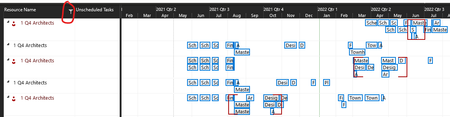
It now groups all the projects under each resource in the 'Team Planner' view like I wanted:
I don't know how I fixed this.
For context, this is how it used to show that resource split between the projects instead of grouped together:
Again, I am not clear on how I changed this......
- John-projectJan 05, 2022Silver ContributorReuben,
The screen shot you posted earlier this morning of the Resource Usage view in the master file indicates resources are coming from each subproject, not from the pool. I can't tell what you might have done such that it now works but you gave the correct answers to my questions so I think you are on the right path. But, I'll give you one more thought. When working with linked structures in Project, you can never rename, move, overwrite, or save off to another location any of the files in the structure. Ideally all files should be in a single folder on a local drive and not be operated over a network.
John- ReubenJan 13, 2022Iron Contributor
John-project I figured out why it was showing the resources separately but it did create another question you may be able to answer.
I realized that when I open the project it asks me if I want to open the Shared Resources pool file. If I click 'No' then the Team Planner will show the resources seperately. If I click 'Yes' then the Team Planner will show the resources grouped together.
My question: Is it best practice to have the Resource Pool file open whenever working on files that are using it?