Forum Discussion

Schedule Report
 Jun 08, 2022RobertOrnelas,
Yeah Project has a lot of subtle options that can make all the difference.
1. Double click on the summary line to bring up the task information window. Check the "Hide Bar" option. That will hide the summary line bar but allow rolled up subtask bars to appear, as long as the Rollup field is marked ad "yes" for the summary and all subtasks.
2. There is no "Subtask Name" field, the field is simply "Name", as shown in my screenshot.
Does that help?
John

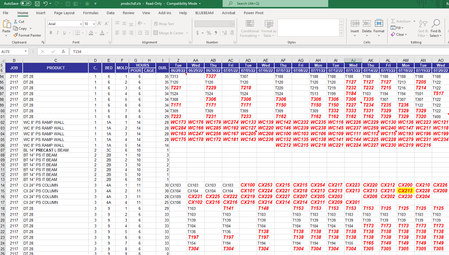
Thanks, everyone. I am using Project Professional Desktop. Our macros just shift rows left and right and update daily production by moving the dates to make it behave like a Gantt chart. It's really just like I described it. If you think in MS Project terms, it's just individual tasks rolled up into a summary task, but you can still see the individual task labels in one row. In MS Project, each subtask takes up an entire row, leaving a lot of empty space in the Gantt chart. I looked into Power BI, and that's a lot of money to spend for a report for an already powerful and expensive tool (Project). Before I spend that kind of money, I'll try creating macros in Project, or export my Data to Excel. I've almost been able to create this view in Primavera SureTrack Software a long time ago, but it was still very inefficient with space. I can't be the only person who would benefit from a production schedule like this that eliminates all of the unnecessary graphics and white space that are shown in a typical Gantt chart.
It seems like one of your main focus items is to show task Gantt bars at summary level and that is indeed possible with Project. Take this example:
When the summary is collapsed, this is what appears.
Does that help? If so, what else do you need from Project? Keep in mind you won't get all the flexibility of the open format offered by Excel but you will get the benefits of an app that's dedicated to scheduling. And as you note, exporting Project to Excel for custom reporting is readily done with VBA.
John
- RobertOrnelasJun 08, 2022Iron Contributor
John-project You are so close!! Now I just need labels, as shown below. I'm trying to see if I can replicate this. (this is a photoshopped screen grab of your picture)
- John-projectJun 08, 2022Silver Contributor
Well that's easy enough, it's just a matter of setting up the format of the Bar Styles.
John
- RobertOrnelasJun 08, 2022Iron ContributorThat's where I'm stuck. so many options...
mine is showing up as a summary type bar as you have shown above, while yours is formatted as a Rolled up task. Mine is continuous, while yours stops and starts for each subtask. Also, I don't see a text option for "Subtask Name", which is what I really want. Is It called something else? I'm still testing, but I think Project is treating it as one summary bar, rather than a bunch of subtask bars.