Forum Discussion

jbajwa
Aug 12, 2024Copper Contributor
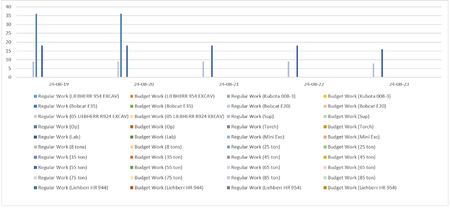
Schedule report chart editing
Hello Guys, I am trying to edit the chart to hide the resource legends that have no value or the ones that are not used. The bar chart itself is very small but the unused legends are taking most ...
- Aug 13, 2024jbajwa --
You are more than welcome for the help, my friend! Would you kindly mark my reply as the "best response" for your question? Thanks!

Aug 13, 2024
jbajwa --
If you click anywhere in the chart, Microsoft Project should display three floating buttons to the upper right corner of the chart. If you float your mouse pointer over the buttons individually, you should see that they are the Chart Elements button (it looks like a big + button), the Chart Styles button (it looks like a paintbrush button), and the Chart Filters button (it looks like a funnel button). Click the Chart Filters button. In the flyout menu, you should be able to hide the values for the resources that are not being used. Hope this helps.
If you click anywhere in the chart, Microsoft Project should display three floating buttons to the upper right corner of the chart. If you float your mouse pointer over the buttons individually, you should see that they are the Chart Elements button (it looks like a big + button), the Chart Styles button (it looks like a paintbrush button), and the Chart Filters button (it looks like a funnel button). Click the Chart Filters button. In the flyout menu, you should be able to hide the values for the resources that are not being used. Hope this helps.
 jbajwaAug 13, 2024Copper ContributorThanks Dale
Thanks for the solution. This is exactly what I was looking for.- Aug 13, 2024jbajwa --
You are more than welcome for the help, my friend! Would you kindly mark my reply as the "best response" for your question? Thanks!