Forum Discussion

jbajwa
Aug 12, 2024Copper Contributor
Schedule report chart editing
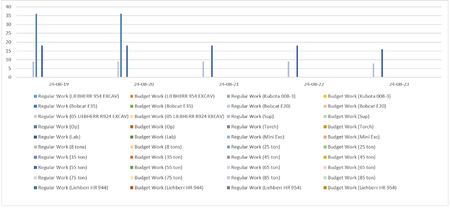
Hello Guys, I am trying to edit the chart to hide the resource legends that have no value or the ones that are not used. The bar chart itself is very small but the unused legends are taking most ...
- Aug 13, 2024jbajwa --
You are more than welcome for the help, my friend! Would you kindly mark my reply as the "best response" for your question? Thanks!


jbajwa
Aug 12, 2024Copper Contributor
- I am using Project 2024. Version 2407 Build 17830.20138
- I am creating a custom report showing the resources utilization on weekly basis, to compare the budgeted/ actual resource utilization.
Thanks!
JB

John-project
Aug 12, 2024Silver Contributor
JB,
Thanks for the info. Unfortunately I only have Project 2019 which does not have resource utilization report, (it must have been added a later version), so I can't help you. Hopefully, someone else will jump in with help.
John
Thanks for the info. Unfortunately I only have Project 2019 which does not have resource utilization report, (it must have been added a later version), so I can't help you. Hopefully, someone else will jump in with help.
John
- jbajwaAug 12, 2024Copper ContributorThanks John
There is no resource utilization report as such, what i am doing is, i am baselining the estimate in the microsoft project (basically rebuilding the estimate in the MS Project) and once the project starts, i track the manpower and equipment. Once that is done, i created a custom report and created the chart comparing budgeted with the actual resources.
I am just getting started at this and wants to see what can be done to fix the legends issue.