Forum Discussion

Marion_kd
Jan 17, 2024Copper Contributor
Resource Pool - save location
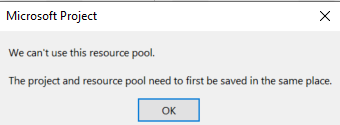
We have about 8 -10 projects ongoing and I was going to set up a central resource pool to support each individual project. I have the resource pool saved in one location and each project file saved ...

Marion_kd
Jan 23, 2024Copper Contributor
Thank you so much for your detailed reply, it is very much appreciated.
We do have access to Project Online.
We have different teams (11) each with their own Project plan (Desktop Version) which each team uses to manage their workload and resources for their particular project which can last 12 - 24 months.
I need to look across all the projects to see
- if there is any download at any time (to squeeze in additional small adhoc projects)
- To check resources for when new projects can start
- Some people work across projects so to ensure they are not being over allocated.
Could I pull together the key information from the various MS Project Desktop Plans into Project Online to manage this, or do I need to set up a "resource file" in Project Online that the rest of the team will need to link to?
Thank you for your guidance.

Jan 23, 2024
Marion_kd --
If you have access to use Project Online, I would recommend that you save each of your projects in your Project Online database. You would also need your Project Online app admin to create all of your organization's resources in the Enterprise Resource Pool. In addition, I would recommend that your app admin download and install the FREE Power BI Report Pack for Project Online. In that free report pack, you will find some useful resource reports that will help you to analyze resource availability and usage across all of your projects. Just a thought. Hope this helps.
If you have access to use Project Online, I would recommend that you save each of your projects in your Project Online database. You would also need your Project Online app admin to create all of your organization's resources in the Enterprise Resource Pool. In addition, I would recommend that your app admin download and install the FREE Power BI Report Pack for Project Online. In that free report pack, you will find some useful resource reports that will help you to analyze resource availability and usage across all of your projects. Just a thought. Hope this helps.