Forum Discussion

Trutz_Stephani
Sep 09, 2019Steel Contributor
Teams integration: Hiding the O365 header in project roadmaps
It is possible to implement a project roadmap in a Teams tab to simplify communication. Simply open the roadmap, then copy the URL from the address bar and add it as a website tab in Teams. By addin...
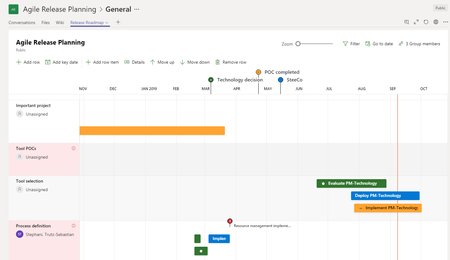

locious
Aug 03, 2020Copper Contributor
Trutz_Stephani the URL I provided earlier is the new project for the web. Bus i still can't get it to work. Have you been able to?

Trutz_Stephani
Aug 03, 2020Steel Contributor
Hi locious ,
Yes that worked for me.
The O365 bars and only hidden when embedded in Teams or a model-driven app. If you use the URL directly in the browser, the sidebars and header appear nonetheless.
- lociousAug 03, 2020Copper Contributor
Trutz_Stephani I am asking if it will work on this url: https://project.microsoft.com/en-US/.
I already am familiar with adding it to an in individual project URL such as the one you just provided.
- Trutz_StephaniAug 03, 2020Steel Contributor
Hi locious ,
It seems then we both completely misunderstood each other.
The parameter doesn't work for the Project entry page, which is the URL you supplied.
 michelbehrOct 20, 2020Copper ContributorHi Trutz - I'm trying adding "dynamicsUI=true" to the URL in MS Teams and it's not working (I'm adding the project as a website app in MS Teams). Am I missing something...?