Forum Discussion

How to delete/remove Team Member from a Project in Project for the Web?
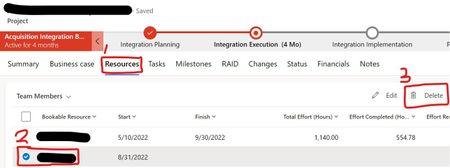


Karen_McCracken - Hi.
I had the reply below from Microsoft and it worked (in the past this was possible from the UI). Hope this helps.
- In the script below, replace your project id with the actual GUID of the affected project, and run the script.
var projectId = "your project id";
var data = { "msdyn_scheduler": 192350000 };
Xrm.WebApi.updateRecord("msdyn_project", projectId, data).then((result) =>
{
console.log(result);
}
);
 RodFrommJul 10, 2023Steel Contributor
I just tested this with a User type resource in a named instance using the Project Accelerator. I was unable to delete them if any of the following were true:
1. They were assigned to any project group2. They were assigned to a task, but not assigned to the project's group.
3. Edited 7/11/23 - In the Project Accelerator, if they were ever assigned to the Project Manager field on the Summary tab. Meaning, I assigned them to the field, saved the project then replaced their name with another. I could not delete the resource. I repeated this test multiple times and got the same results. I looked at the Power App code and as shown below there is an Event Handler tied to this field, which explains the behavoir. However, I need to look a little deeper to see if I can determine why this field is treating different tahtn the rest.
I also assigned resources to all the other fields on the Project Accelerator's Summary, Issues, Risks, Changes views and within Programs and I could delete the resource, which is what I expected. Neil_KellyDec 07, 2023Copper Contributor
kDesorcy could never get it to work and client was unhappy with proposed work around.
Unfortunately our solution was to stop using Project for the Web 😞
for this and other reasons.
