Forum Discussion

community202
Mar 24, 2021Copper Contributor
Project Plan 5, home page setup is different
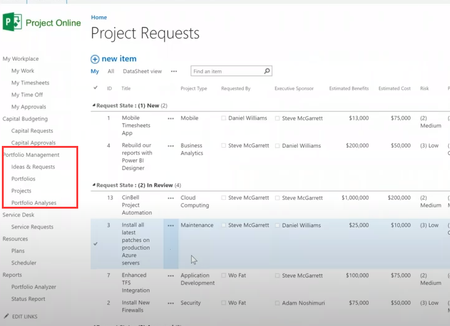
Hello everyone, I am quite new with Project Plan 5, I used to see some pictures showing the possibilities of this software such as below, able to take Project Request, Ideas etc. However...

Mar 24, 2021
Chen -- What you see in the first screenshot is a custom SharePoint list item named Ideas & Requests. This is NOT a default feature in Project Online. If this is something your organization needs, either your Project Online application administrator or a SharePoint administrator can create the custom SharePoint list for you. But you would need to supply them with the fields that must be filled in to create the new project request. After approval, the SharePoint list item can be converted to an enterprise project.

Sam_Whitehouse
Mar 24, 2021Brass Contributor
Hi Chen,
In addition to Dales advice, there is the option to work alongside a Microsoft partner who can help you configure a Project Online environment for your organization.
If you wanted to do this, you can use the below link to search for a local partner
https://www.microsoft.com/en-us/solution-providers/home
In addition to Dales advice, there is the option to work alongside a Microsoft partner who can help you configure a Project Online environment for your organization.
If you wanted to do this, you can use the below link to search for a local partner
https://www.microsoft.com/en-us/solution-providers/home
 community202Mar 26, 2021Copper ContributorHi Sam, Can the local partner only provide consulting advice? Since I have already bought the software.
- Sam_WhitehouseMar 26, 2021Brass ContributorCorrect, the partner would review your requirements for the solution and help you deploy it in your tenant