Forum Discussion

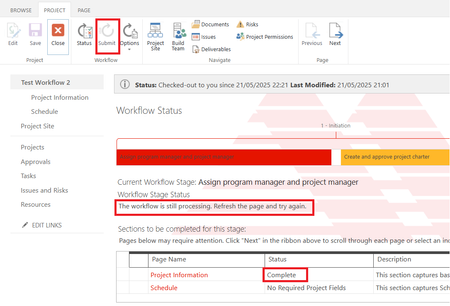
Project Online 'Submit' button is greyed out and the workflow is stuck at processing stage.

Hello Arintra ,
The retirement is at the M365 tenant level. I'd confirm with It when the M365 tenant was created.
Regarding alternative solutions, it depends on your requirements. Power Automate is not a direct replacement for the built in workflows in Project Online either, it does not have the same capability when it comes to Project Online. Here is a post Using Power Automate for Project Lifecycle Workflows in Project Online – Part 1 | Microsoft Community Hub
Paul

Hello Paul_Mather ,
One more question regarding Power Automate license, I just found that the account that I use for setting up Project Online has Power Automate app included. After I check this account's license, it shows that this account includes Power Automate for Project and Power Automate Free, though only Project Plan 3 license is assigned to this account.
Does this mean Power Automate for Project license is already bundled to Project Plan 3 license, it's no need to pay more for Power Automate license if the feature required for Project is just standard project workflow?
Please advise.
- Paul_MatherMay 27, 2025MVP
Hello Arintra ,
It depends what you need to build in Power Automate, you might find that the license you have is enough. If you need any of the Premium connectors, you will have to pay for a new license. You'll see when you start to use Power Automate what is available to you.
Paul