Forum Discussion

Project Online 'Submit' button is greyed out and the workflow is stuck at processing stage.
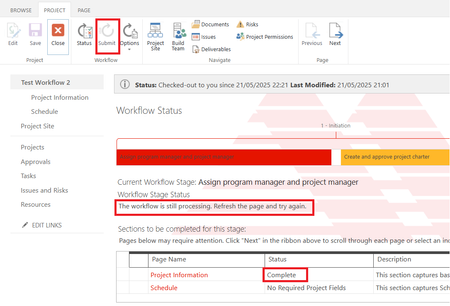

It seems like the workflow doesn't work anymore. I have tried modifying the workflow to change from a stage to another by publishing a project as the workflow below. After I published the workflow and tested. Once I published the project, the stage doesn't change. Not sure if I miss setting up something in Project. I've activated in Site Settings as below:
Site Collection Administration > Site Collection Features
1) SharePoint Server Publishing Infrastructure
2) SharePoint 2007 Workflows
3) Publishing Approval Workflow
4) Workflow
Site Actions > Manage Site Features
1) Project Proposal Workflow
2) Project Web App Connectivity

Hello Arintra If your Microsoft tenant was created after 2nd April 2024 then this is probably why this does not work as Microsoft disabled the SharePoint 2013 workflow feature when these new tenants were created after 2nd April 2024. Do you know when the Microsoft 365 tenant was created?
Paul
- ArintraMay 23, 2025Copper Contributor
Hello Paul_Mather
Thank you for the information. I am checking with IT when the Microsoft 365 tenant was created. I think it has been created for a few years ago, but definitely Project Online site was just created early this month. Is the retirement timeline applied to Microsoft 365 tenant or Project Online site?If I use Power Automate, is it connected to PWA and the Workflow Stage Status still shows tracking of the workflow?
Since my project has not reserved budget for Power Automate license cost, is there any other solution than Power Automate?- Paul_MatherMay 23, 2025MVP
Hello Arintra ,
The retirement is at the M365 tenant level. I'd confirm with It when the M365 tenant was created.
Regarding alternative solutions, it depends on your requirements. Power Automate is not a direct replacement for the built in workflows in Project Online either, it does not have the same capability when it comes to Project Online. Here is a post Using Power Automate for Project Lifecycle Workflows in Project Online – Part 1 | Microsoft Community Hub
Paul- ArintraMay 25, 2025Copper Contributor
Hello Paul_Mather ,
One more question regarding Power Automate license, I just found that the account that I use for setting up Project Online has Power Automate app included. After I check this account's license, it shows that this account includes Power Automate for Project and Power Automate Free, though only Project Plan 3 license is assigned to this account.
Does this mean Power Automate for Project license is already bundled to Project Plan 3 license, it's no need to pay more for Power Automate license if the feature required for Project is just standard project workflow?Please advise.