Forum Discussion

Ylg78
Jun 02, 2024Brass Contributor
Project online error 10102 cannot checkout
Does anyone knows how to fix the error 10102? there is a lot of record of this issue on the web but no solution. Its the one when you try to open a project with the desktop client, pressing the chec...
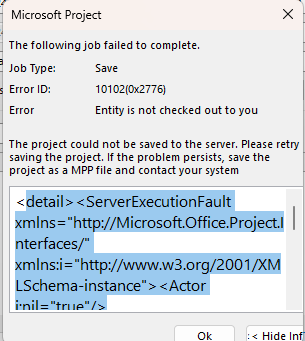
 Jun 03, 2024I found this thread that is a bit old, nit sure if this is related to my problem.
https://integent.com/microsoft-project-server-2013-root-element-is-missing/

Paul_Mather
Jun 03, 2024MVP
Hello Ylg78,
If you look at the Manage Queue in PWA Admin settings, change the History to a much earlier date, from around when the issue started, then click the Refresh Status button on the grid, are there any jobs relating to this project that are still processing / not completed? If so, you might need to retry the job or cancel it. Depending on what the job type was, when you cancel, that change might need to be reapplied when can get the project publishing again etc.
Paul
Ylg78
Jun 03, 2024Brass Contributor
Thank you Paul. I searched over 6 months of history but there is no ongoing job. All the jobs have been cancelled. When I click on the error link in the error column, it's the same error for all canceled job: "Root element is missing"....
any other idea?
- Ylg78Jun 03, 2024Brass ContributorI found this thread that is a bit old, nit sure if this is related to my problem.
https://integent.com/microsoft-project-server-2013-root-element-is-missing/- Ylg78Jun 11, 2024Brass ContributorIt looks like I was able to fix it by disconnecting the desktop client from ther PWA through the "manage account" in the "info" menu, then readding the aacount.
all problems are gone.