Forum Discussion

Project online activity tab missing on my PWA Projects
- Jan 27, 2022
HelloKnut_Aandal ,
In that case the page has not been deleted but it looks like you have deleted the web part from that page. See the steps below:
- Access the Schedule page
- Click the Page tab > Edit page
- Click "Add a web part"
- Find and select "Project Web App" in the Categories
- Select the "Details" part and click Add
- Click Stop Editing
That should solve the issue.
Paul

Hello Knut_Aandal ,
Is the page missing or is a web part missing from a page that is still accessible? If so, is this the web part that shows the project schedule tasks?
Paul

Paul_Mather Hello and thank you for your reply.
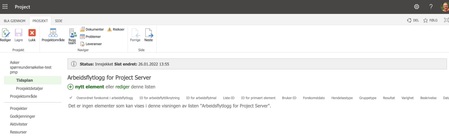
Earlier I had a tab/page option i the left side navigation after selecting the project. Now only Timeline and Project details(i think they are called in English) are shown. In the missing page I all activities, gant charts and other info was shown.
I would be grateful if you have a suggestion on how to get it back.
Knut
- Paul_MatherJan 27, 2022MVP
- Knut_AandalJan 27, 2022Copper ContributorHi again.
Yes it is and yes i probably did hit Delete (in my eager to learn without a tutorial or "adult" supervision).- Paul_MatherJan 27, 2022MVP
Hello Knut_Aandal ,
If you navigate here: Settings cog (top right corner) > PWA Settings > Project Details Pages, do you see the "Schedule" page there?
Paul